Using AI for QA is getting more attention as coding assistants like Claude Code and Codex help developers write and ship code much faster. In a GitHub experiment built around a single coding task, developers using Copilot finished 55% faster. This speed matters because many software teams feel they have to ship more often to keep up with competitors.
Unfortunately, the increased developer velocity puts more pressure on your team to validate the changes moving through the pipeline before they reach users. In SmartBear’s 2026 survey of software testing decision-makers, 60% reported quality issues because development outpaced testing. Teams that still rely heavily on manual testing have to keep up by working through more features, permissions, and integrations before each release.
The same survey found that 70% of software engineering leaders (including CTOs, CIOs, QA Directors) were concerned application quality was degrading.
That’s not all.
A separate CloudBees survey found that 81% of enterprise tech leaders had seen more production issues tied to AI-generated code.
Taken together, these numbers suggest it’s difficult to solve an AI-speed bottleneck with human-speed testing.
Agentic QA gives teams a way to automate more of that work. Between them, tools like Playwright’s test agents, mabl, and Applitools Autonomous can explore an application, develop test plans, generate and execute tests, and propose fixes for failures. Your engineers define the expected behavior and review the results, including whether a proposed fix preserves what the test was supposed to check.
Is regression testing or test maintenance slowing your releases? ClickIT’s AI and QA engineers can help you strengthen automation and integrate agents into your engineering workflows. Discuss your QA automation needs with our team.
Blog Overview
In this guide to using AI for QA, I’ll break down:
- The Automation Shift: How AI-assisted, AI-augmented, and agentic testing change the decisions your team delegates.
- Core Framework Capabilities: What to look for in self-healing, assertions, test data, failure analysis, autonomous test generation, and predictive test selection, including tools like Playwright’s test agents, mabl, and Applitools.
- Testing AI Applications: How to evaluate variable responses and check whether you can trust your LLM judge.
- A Controlled Rollout: Where to start, how to protect existing release checks, and which metrics should guide expansion.
- The QA Team’s Role: The skills and engineering expertise needed to design, operate, and oversee these workflows.
By the end, you’ll know where to start, what evidence to require, and which responsibilities your team should retain as it adopts AI in QA.
The Evolution from Traditional Automation to Agentic QA
Traditional test automation follows the steps and checks your team defines. A script can verify a login, check a shopping cart’s total, or confirm that checkout rejects a missing ZIP code. Your team specifies the inputs and expected results, then runs those checks repeatedly.
As your product changes, this process will need maintenance. For instance, if a script locates a button using #place-order and a developer changes its ID to #submit-order, the test can fail even though checkout still works. Modern frameworks already help with resilient locators and automatic waiting. Your team still decides which scenarios to cover and how each check changes.
Rule-Based vs. Intent-Based Testing
A rule-based script encodes actions and expected results: click this selector, type this value, assert this text. An intent-based test starts with an outcome, such as “checkout rejects an address with no ZIP code.” The agent can plan and adapt the steps using your acceptance criteria and what it observes in the application.
What Makes Testing Agentic?
With agentic QA, you give the system a testing objective and acceptance criteria. The agent uses those instructions and observations from the application to decide what to do next. It can explore the UI, interpret application context, plan scenarios, use tools, and adjust its actions based on results.
For checkout, that could mean locating the shipping form, trying valid and incomplete addresses, and checking the responses. Your requirements establish which fields are mandatory and what should happen when information is missing. The agent chooses how to investigate those requirements within the scope you allow.
That is the mindset shift: your team delegates decisions about how to investigate behavior while retaining responsibility for defining correct behavior.
Three Levels of Using AI for QA
I recommend assessing AI testing frameworks by how much of the workflow they handle:
- AI-assisted: AI drafts scripts or suggests test cases, as in GitHub Copilot’s test-generation workflow. Your engineers review the output and decide what runs.
- AI-augmented: AI supports particular tasks within an existing workflow, such as self-healing locators and failure analysis. The broader testing process remains predefined.
- Fully agentic within a defined scope: Agents coordinate planning, exploration, execution, and reporting, using feedback to choose subsequent actions. Your team defines their permissions, stopping conditions, and approval points.
These categories help you decide how much decision-making to delegate.
Traditional Automation vs. Agentic QA
| Criterion | Traditional Automation | Agentic QA |
| Authoring | Engineers define executable scenarios and expected results. | Agents develop scenarios and tests from goals and application context. |
| Maintenance | Engineers investigate failures and update affected tests. | Agents can investigate failures and propose changes for review. |
| Coverage | Follows scenarios and inputs represented in the suite. | Can explore additional paths; complete coverage is not guaranteed. |
| Determinism | Fixed logic supports repeatable execution, although timing and environment can cause flakiness. | Agent decisions can vary; generated scripts can run through a conventional test runner. |
| Cost | Authoring, maintenance, and execution infrastructure. | Model calls, tool execution, and review, alongside potential engineering-time savings. |
Core Capabilities of Modern AI Testing Frameworks
When evaluating AI testing frameworks, my recommendation is to look at which tasks they can take off your team’s plate and how your engineers can verify the results. I would also check what happens when a tool encounters an unexpected change or makes a mistake. Here are six capabilities worth assessing, with practical examples and the safeguards I would keep in place.
- Self-Healing Tests
Self-healing helps tests recover when an element’s attributes or location change. mabl’s auto-healing uses element history and, in its advanced mode, generative AI to identify semantic matches. Testim also records automatic locator improvements in its revision history, giving your team a visible record of which tests changed and which steps need review.
Playwright’s role-based locators also improve resilience without requiring AI.
The risk is healing around a real regression. For example, if a developer removes the “Place Order” button and the framework selects another control, weak assertions could allow the test to pass. mabl explicitly documents this false-pass risk. A single-author benchmark reported in SD Times found that, across 136 controlled UI changes in two applications, unsupervised repairs selected the wrong element roughly a quarter of the time.
To manage that risk, log and review healed locators. Require the original target, replacement, and supporting evidence. mabl’s review tools expose screenshots, element history, and confidence details.
I would ask two questions before approving a repair: did it recover the intended element, and does the test still check the original business requirement?
- Smart Assertions
Smart assertions evaluate visual or semantic context against defined expectations. For example, Applitools Eyes compares captured screens against approved baselines using configurable match levels. mabl’s visual assertions use natural-language criteria to evaluate screenshots.
For checkout, you could check whether an error message explains how to correct a missing shipping field, even when its wording changes. I recommend keeping exact assertions for order totals, permissions, and saved transactions.
For these AI-based checks, require the screenshot and the criteria used to evaluate it. Also, check that the relevant content is visible, because mabl’s visual assertions exclude off-screen content.
- Synthetic Data Generation
AI can create test inputs from descriptions of the cases you need. Applitools Autonomous supports generating data for requested personas, value ranges, and edge cases.
For a shipping form, request names with apostrophes, missing ZIP codes, and boundary-length addresses. If a street field allows 200 characters, test 199, 200, and 201, with the expected result specified for each.
Before using the generated data, validate it against your requirements. BlazeMeter’s guidance recommends checking field constraints, relationships between records, and sensitive information. Save the dataset with the test result so another engineer can reproduce a failure using the same inputs.
- Failure Analysis and Reproducible Evidence
A failed checkout test still needs a diagnosis. mabl’s failure analysis supports its explanations with screenshots, log excerpts, historical trends, and step-level details. Playwright Trace Viewer lets engineers inspect actions, page snapshots, console output, and network requests.
That evidence gives your team a way to check the diagnosis. Keep the failing assertion, test inputs, environment details, and proposed changes together. Treat the agent’s explanation as a hypothesis until the evidence supports it.
- Autonomous Test Generation and Exploration
This is where AI for QA connects requirements to executable tests. Playwright’s test agents divide the work into three roles:
- Planner: Explores the application using a request, an initial setup test, and optional product requirements, such as a user story or ticket, then creates a Markdown test plan.
- Generator: Converts the plan into executable tests and checks selectors and assertions against the application.
- Healer: Investigates failing steps, proposes patches, and reruns tests.
To keep that workflow aligned with your requirements, I suggest giving the generator both the approved plan and exploration findings. Keep expected outcomes anchored to your acceptance criteria so existing application behavior does not become the definition of correctness.
Require traceability from each requirement to its scenarios, generated tests, and results. Playwright’s documentation says the healer can mark tests as skipped when it believes application functionality is broken. Review skipped tests and changed assertions before accepting the run.
- Predictive Test Selection
Predictive test selection uses historical code changes and test outcomes to identify which tests are most likely to reveal a regression. For large suites, this can reduce unnecessary execution and shorten feedback time.
In 2018, Facebook (now Meta) reported running about one-third of the tests that depended directly or indirectly on modified code while catching more than 99.9% of regressions before changes reached the shared main branch. This was a machine-learning-based selection system, fitting the AI-augmented category I covered earlier.
To evaluate it safely, retain mandatory release checks and scheduled full-suite runs. Compare the selected tests with the full suite, investigate failures found only by excluded tests, and track escaped defects.
Using AI to Test AI Systems
AI for QA also covers generative AI applications, where the same question can receive several valid answers. A support chatbot can explain your refund policy in different words across runs. As I mentioned earlier, an exact-text check can reject a valid answer simply because its wording changed.
LLM-as-a-Judge
With LLM-as-a-Judge, an evaluator model grades another model’s output against a rubric, or defined assessment criteria. For example, Promptfoo’s llm-rubric can return a score, pass/fail verdict, and reason. DeepEval’s G-Eval also supports criteria written in plain language. This helps your team evaluate many responses for relevance, accuracy, safety, and policy compliance without manually grading every answer.
To investigate questionable scores, Langfuse traces judge executions, letting your team inspect the evaluation prompt, model response, and token usage behind each result.
For retrieval-augmented generation (RAG), which uses retrieved documents to inform answers, Ragas’s faithfulness metric checks whether those documents support the response’s claims. A chatbot can faithfully repeat an outdated refund policy, so factual accuracy also depends on the source material.
Calibrate the Judge Before Trusting Its Scores
Keep in mind that judges can score inconsistently. Research also documents biases involving answer length, presentation order, and preference for their own outputs.
To manage that risk, I recommend calibrating the judge against a human-labeled golden dataset containing questions, responses, and expert verdicts. Promptfoo suggests starting with 30–50 diverse examples, covering successes, failures, and borderline cases. For the refund chatbot, include accurate explanations, invented exceptions, and questions requiring human escalation.
Compare the judge’s verdicts with the human labels and clarify ambiguous criteria. Then, validate it on separate examples that were not used to adjust the rubric. Finally, review incorrect passes, especially on high-risk cases, before deciding whether the judge is reliable enough for your workflow. Keep human review for high-risk cases and disagreements.
Which Tools Fit Your QA Needs?
Here’s a quick snapshot to help you choose the right tools for your agentic QA workflow:
| What you need | Tools covered in this guide | What to check before trusting results |
| Test generation and repair | Playwright test agents | Generated tests match acceptance criteria. Review skipped tests, proposed repairs, and changed assertions. |
| Self-healing locators | mabl, Testim, Healenium for Selenium | Each repair identifies the intended element and preserves the original business checks. |
| Visual and semantic assertions | Applitools Eyes, mabl visual assertions | Baselines and evaluation criteria are correct, and the relevant content is captured. Keep exact checks for totals and permissions. |
| Synthetic test data | Applitools Autonomous | Generated records meet field constraints, preserve relationships, and contain no sensitive information. Save inputs for reproduction. |
| Failure analysis and execution evidence | mabl for AI-assisted analysis; Playwright Trace Viewer for inspecting runs | The diagnosis matches the failing assertion, logs, screenshots, and application state. |
| LLM evaluation and tracing | Promptfoo, DeepEval, Ragas; Langfuse for tracing evaluations | Judge verdicts agree with human-labeled examples, grounding checks use reliable sources, and evaluation evidence is inspectable. |
Best Practices for Transitioning to an AI-Driven QA Culture
You can start adopting agentic QA without changing how code reaches production. Here’s how to roll out AI for QA without disrupting your releases:
Start With One Regression Suite
I recommend introducing AI for QA through one high-maintenance or flaky regression suite. Record its current performance, then run the agent-assisted work alongside existing checks in a separate CI job that does not block releases. Keep your established release requirements in place while you evaluate the pilot.
Use that pilot to check how the tool handles your application’s difficult pages and intended UI changes. For example, change a class name in staging and inspect whether the test still verifies the right behavior. A resilient locator may survive the change without needing a repair. If the locator heals, review the evidence behind its replacement.
Before choosing a tool, also check where test code, results, and change history live, and what you can export. Ask vendors which model providers process screenshots, page content, and logs, how long those records are retained, and whether they are used for training.
Example for a first Playwright pilot
Start with a configured Playwright Test project, a supported coding assistant, and a staging checkout using synthetic customers and a sandbox payment service.
For VS Code, add the test-agent definitions from the project terminal:
npx playwright init-agents –loop=vscode
Then work through one requirement:
- Prepare the application: Create a seed test that opens the staging app and prepares a guest cart.
- Plan the check: Ask the planner to verify that a missing ZIP code prevents order creation. Review its plan in specs/.
- Generate and review: Have the generator create tests under tests/. Confirm that they check the error message and the absence of a saved order.
- Verify defect detection: Introduce a controlled defect in staging and confirm that the test catches it. Restore the application, then run the approved test alongside existing CI checks.
Regenerate the agent definitions after upgrading Playwright.
Keep Changes Reviewable and Release Checks Stable
To fit the pilot into your existing workflow, keep AI-generated tests as reviewable code in pull requests or GitLab merge requests. Playwright’s test agents produce Markdown plans and executable test files your team can review. Version the tests, prompts, model configuration, dependencies, and test datasets so changes remain traceable.
For CI integration, Playwright provides configurations for GitHub Actions, GitLab CI, and Jenkins. Promptfoo documents integrations with the same systems for LLM evaluations. Check how agent-submitted changes trigger those jobs: GitHub documents that pushes made by a workflow using GITHUB_TOKEN do not start another push-triggered workflow.
To protect release decisions, use branch protection rules to require reviews and established status checks. Release jobs should execute approved tests, and proposed repairs should return for review. Make the pilot’s approved checks mandatory only after evaluating their reliability.
Alongside those reviews, limit agents to test environments and approved tools, without production credentials or permission to merge their own changes. Give pipeline tokens the minimum required permissions, and set limits on execution time, repair attempts, and model spending. For Playwright runs, configure a global timeout below the CI job limit so the test runner can stop and produce its report.
Treat application content, tickets, and files as untrusted input. OWASP identifies indirect prompt injection as a risk when models process external material. An agent exploring a page could encounter embedded instructions that attempt to redirect its actions. To limit that risk, enforce tool permissions and approval requirements outside the model, and redact secrets from prompts and saved traces.
Measure the Pilot Before Expanding
Compare the same suite before and after adoption using these five metrics:
- Flaky-test rate: Share of executed tests that fail initially and pass on retry.
- Maintenance hours: Time spent investigating failures, correcting tests, and reviewing agent-generated changes.
- Escaped defects: Bugs discovered after release in the pilot’s application area, tracked by severity over comparable release periods.
- CI feedback time: Time from a commit to usable test results, including queue time.
- LLM cost per run: Total model charges across planning, execution, judging, and repair attempts, including retries. Ragas’s cost analysis supports calculations using separate input- and output-token prices.
For a fair comparison, keep test scope, retry settings, and CI resources consistent. Record skipped tests separately, and review changed assertions, especially since Playwright’s healer can skip a test when it believes application functionality is broken.
Before expanding, I would want to see lower maintenance effort or faster feedback within budget, while preserving required coverage and defect detection. I would also check whether more severe defects were reaching production.
The Evolving Role of the QA Engineer
Many testers see agents generating and repairing tests and wonder whether their job is next. But the available labor data doesn’t support that fear. For instance, the U.S. Bureau of Labor Statistics projects 6% employment growth for software QA analysts and testers from 2025 to 2035, compared with 3% for all occupations. That forecast covers the occupation as a whole, so individual responsibilities and staffing needs can still change. There is also evidence of work shifting within QA roles. In TestRail’s Software Testing & Quality Report, 34% said AI had enabled them to spend more time on complex, higher-value work.
In the release for the World Quality Report 2025, OpenText’s Tal Levi-Joseph put it well: “AI amplifies capability, but it cannot substitute for it.” At the same time, running scripted checks by hand is exactly the kind of work agents can automate, which is why I expect the role to keep moving toward judgment.
Taking Greater Ownership of Quality
If you’re an engineering lead planning to adopt AI for QA, it’s important to help your experienced testers take more ownership of quality strategy and architecture. A QA architect designs how tests, agents, data, and environments work together to support release decisions. In practice, that includes defining acceptance criteria with product stakeholders, calibrating the LLM judge, and setting the release checks covered earlier.
For an experienced manual tester, this builds on existing strengths, such as understanding customer behavior, questioning unclear requirements, and identifying risks. The BLS already lists risk analysis, exploratory testing, and stakeholder feedback among QA responsibilities.
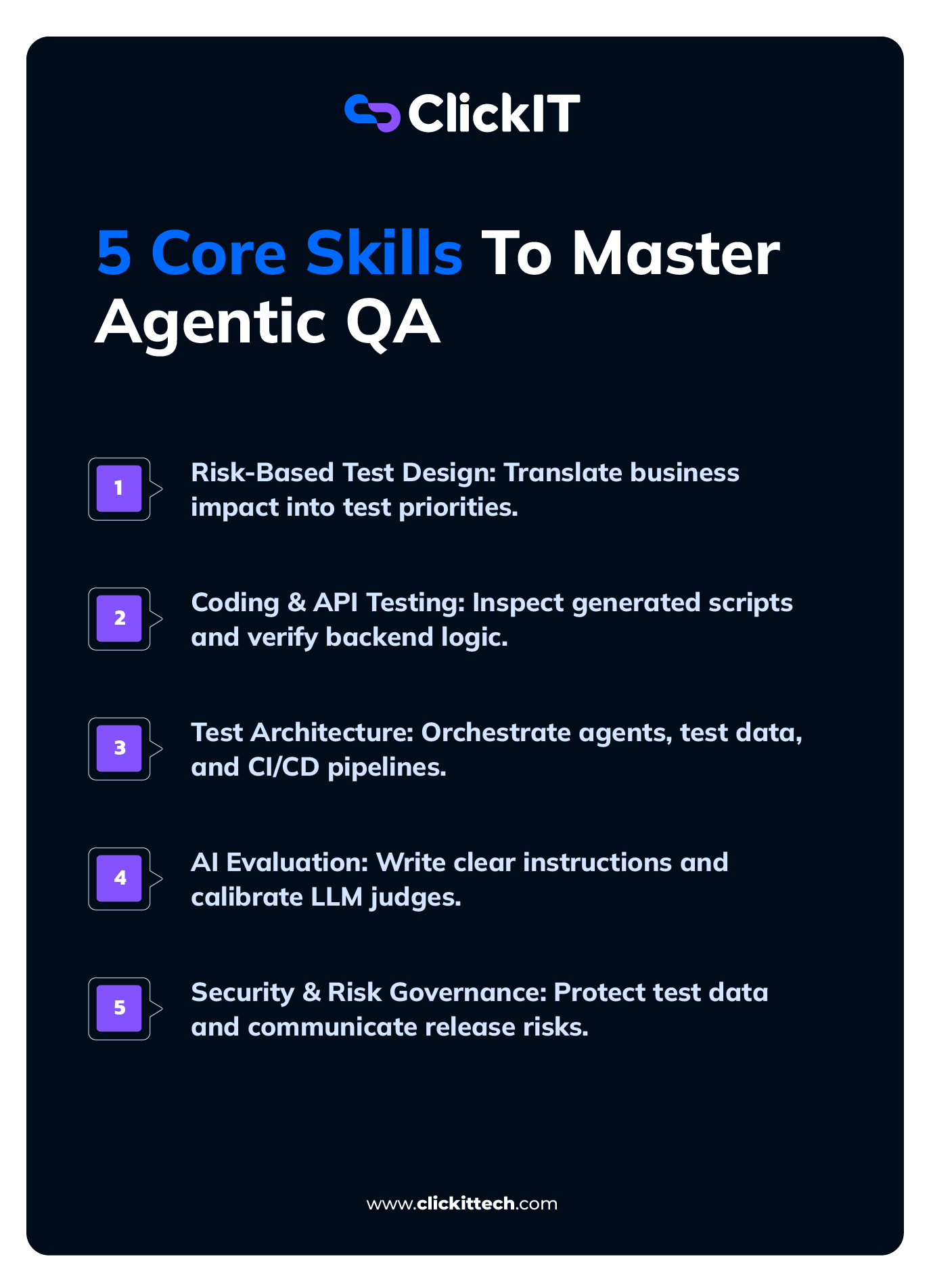
To support that transition, I recommend developing five skill areas:
- Risk-based test design: Translate business requirements and customer impact into test priorities.
- Coding and API testing: Inspect generated scripts, debug failures, and verify backend behavior.
- Test architecture and orchestration: Connect agents, test data, environments, and CI pipelines.
- AI evaluation: Write clear instructions, assess generated tests and model outputs, and recognize unreliable judgments.
- Security and communication: Protect test data and explain unresolved risks to engineering and product leaders.
For structured training, ISTQB’s Testing with Generative AI syllabus covers prompting, risk management, testing architectures, and organizational adoption.
How to Get the Right Expertise for Agentic QA
Expanding agentic QA requires engineers who can design, integrate, and oversee these workflows. The skills gap is already visible: 50% of respondents said their organizations lack AI/ML expertise, and only 15% had achieved enterprise-wide generative-AI implementation in quality engineering.
To fill those gaps, ClickIT’s nearshore staff augmentation gives you access to vetted LATAM engineers with overlapping U.S. working hours and reduces internal recruiting overhead.
You can hire AI and QA automation engineers in three to five days, with candidate selection focused on your stack and project requirements. The engagement can support your existing team or provide a dedicated team for a specific project. For a practical example, see how ClickIT helped SWARM Engineering expand its engineering capacity through automated QA, data validation, and AI-agent development.
Talk to ClickIT about building a QA team around your technical requirements and budget.
Frequently Asked Questions About AI For QA
AI-driven testing can plan scenarios, generate tests, and propose repairs while Selenium WebDriver only executes the browser actions your team programs. Playwright’s test agents are one example, with separate AI agents for planning, generating, and healing tests. You can also use coding agents to write Selenium tests and add Healenium for locator healing. Your team still defines expected behavior and reviews changes.
Granting agents unrestricted code access introduces security risks, but it can be safe if you control permissions, data handling, and the provider’s terms. Whether your code trains models depends on the provider, plan, and settings. For example, GitHub does not use Copilot Business or Enterprise data for model training. Anthropic does not train on inputs to its Claude Code coding agent under commercial terms unless you opt in. Also, check retention and downstream providers.
OWASP advises giving agents only the minimum necessary tools and permissions, with human approval for high-impact actions. Restrict agents to the repositories they need and review every code change.
AI testing frameworks can reduce unreliable results through execution evidence, confidence signals, and calibrated judgments. The browser testing tool mabl exposes locator-repair evidence, and the LLM evaluation tool Promptfoo supports calibration against human labels. DeepEval and Ragas, other LLM evaluation tools, check response consistency with context. Your team should review flagged failures, healed steps, and changed assertions before trusting results.
QA teams need scripting, API testing, CI/CD, clear prompting, and the ability to evaluate AI-generated results. Start by reviewing tests from Playwright’s AI test agents and investigating failures. For AI applications, add rubric design and judge calibration in LLM evaluation tools such as Promptfoo or DeepEval. ISTQB’s Testing with Generative AI syllabus also offers training.
Not entirely. AI is automating parts of QA work, but BLS data still projects 6% job growth from 2025 to 2035. Human QA engineers still define expected behavior, investigate complex failures, and assess release risk, as I discussed earlier. However, AI can automate repetitive QA tasks such as test generation and locator repair, which can change an organization’s staffing needs and individual QA roles, so I believe it’s worth building skills in risk-based test design, AI evaluation, and test architecture.