What actually happens when you ask an AI coding agent to “fix this bug,” and it returns minutes later with code changes, passing test results, and a working solution? The answer goes far beyond standard code completion. Breaking down the Claude Code Architecture diagram shows how an agentic system interprets intent, explores a codebase, calls system tools, runs commands, and iteratively reacts to runtime feedback.
Unlike traditional AI coding assistants that mostly suggest code as you type, Claude Code functions as an agentic harness that runs across your terminal, IDE, desktop, web, and mobile environments. It inspects repositories, reads files, patches code, executes tests, and ties directly into existing developer workflows.
The Claude Code Architecture brings together the underlying model, context management, system tools, permission layers, and repository instructions into a coherent, iterative loop.
Claude Code is available across multiple development environments – from the command line(CLI) and IDE(Integrated Development Environment) extensions to desktop, mobile, and web-based workflows. While the front-end interface changes depending on where you work, the foundational Claude Code Architecture provides a consistent mental model for how agentic workflows operate under the hood: how requests are structured, how context is gathered, how actions are executed in the session’s environment (whether on your local machine or in a cloud sandbox), and how output loops back into the agent.
For engineering teams and platform architects, Claude Code is relevant for reasons well beyond raw developer speed. Once an agent has permission to inspect source trees, run shell commands, alter files, and query external APIs, questions around security, sandboxing, context limits, and human-in-the-loop oversight become just as critical as output quality.
In this article, we will break down the Claude Code Architecture step by step, tracing the path from an initial prompt down to controlled system actions. We will explore how the model, context files, local tools, permission controls, MCP integrations, subagents, and the Agent SDK interact – and what teams can take away when integrating autonomous agents into real-world software delivery pipelines.
What Is Claude Code and How Does It Work?
Before we dig into the Claude Code Architecture, let’s clear up how this thing actually differs from the autocomplete tools we’ve been using for years.
Claude Code is an agentic coding tool built to interact directly with a software project rather than just generating isolated snippets from a prompt. Instead of waiting for copied snippets, it interprets a task, navigates the codebase, edits files, executes shell commands, runs test suites, and coordinates with external developer tooling to see a job through to completion.
The core principle behind Claude Code is that the foundation model never operates in a vacuum. Claude Code pairs the model with a local runtime harness, repository context, explicit operational instructions, system tools, permission boundaries, and external integrations. This setup shifts the paradigm from a passive, single-turn text-completion engine to an active system that can take sequential, goal-driven actions inside your workspace.
Consider a common real-world prompt:
“Find the reason why my application is failing after deployment and fix it.”
With a traditional copilot or chat interface, you would manually hunt down stack traces, paste logs or suspect snippets into a side panel, and ask for a diagnosis. Claude Code enables a fundamentally different workflow. It inspects the repository, locates relevant build configurations and source files, searches for related code paths, runs local diagnostics, reviews the output, applies surgical edits, and runs tests to verify the fix.
This loop is what makes the tool genuinely agentic. The runtime follows an iterative cycle: parse intent, gather grounding context, execute a specific tool action, evaluate the environment’s feedback, and determine the next logical step.
If an initial edit fails a test or breaks a build, the system feeds that error trace back into the loop to course-correct. Claude Code is built around this continuous interplay between inference, tool execution, and runtime feedback, rather than a brittle one-shot prompt-and-response exchange.
That native environment access is really what anchors Claude Code. Instead of operating inside an isolated sandbox, the tool hooks directly into your local machine: it runs shell commands, handles Git workflows, greps through your file tree, and uses configured developer utilities on the fly. When you need it to reach outside the local repo, it talks to external services via the Model Context Protocol (MCP), pulling in remote APIs or docs right where the execution loop needs them.
None of this means you should just hand over the keys to your repo, though. Claude Code handles the heavy lifting of executing engineering tasks, but it doesn’t change fundamental software discipline. You still need sane permission boundaries, automated tests, clean code reviews, and dependable CI/CD pipelines. At the end of the day, any patch spit out by an agent has to survive the exact same build checks and review standards as code written by an engineer on your team.
This operational reality becomes especially critical in enterprise settings. Once an automated agent has the capability to read proprietary code, edit files, execute arbitrary shell commands, and interact with external APIs, the focus shifts well past basic code quality.
Claude Code Architecture demands thoughtful consideration of access boundaries, permissible command scopes, context hygiene, deterministic governance, and auditability for every change it proposes.
Establishing these baseline concepts gives us the context we need to examine the Claude Code Architecture in detail. In the next section, we’ll trace the end-to-end lifecycle of a developer request, from prompt ingestion and context assembly to model reasoning, tool execution, feedback parsing, and the final deliverable.
Claude Code Architecture: From Request to Controlled Action
To see how this works in practice, it helps to trace the complete flow of a developer request. The Claude Code architecture diagram below illustrates this journey from initial prompt ingestion down to guarded local execution and feedback.
What stands out is the continuous feedback loop at the center: instead of stopping at a one-shot response, the runtime consumes live execution output to guide its next action through multi-step engineering tasks.
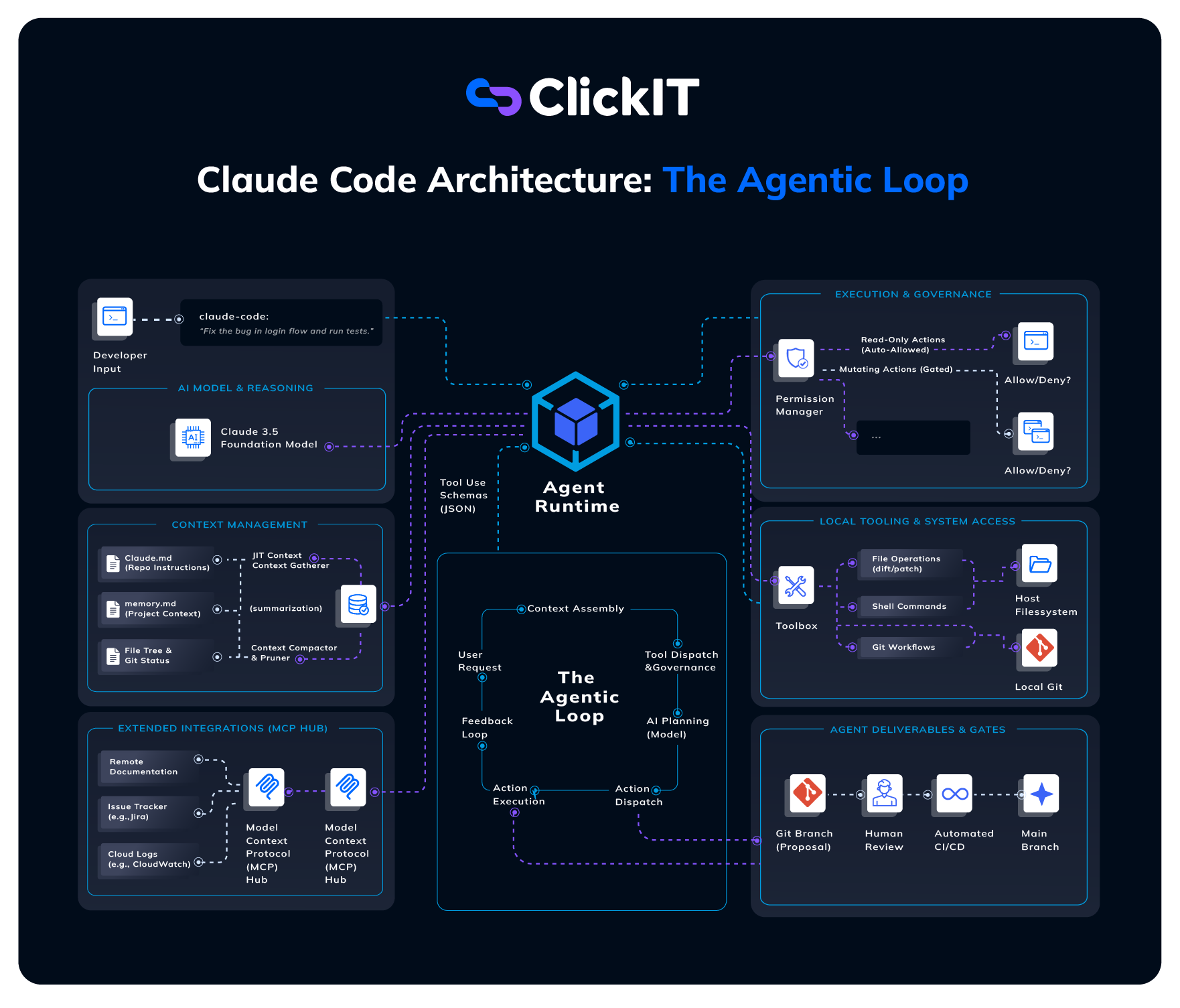
Looking at this loop in action, it becomes clear why Claude Code shouldn’t be treated as a simple API wrapper that spits out isolated code snippets. At its core, it is an execution harness that bridges developer intent with the local machine, coordinates system tools, and reacts dynamically to what those tools return. The model handles the planning, but the runtime does the actual driving.
Every interaction starts with context assembly. Before hitting the model, Claude Code constructs a lightweight baseline: your prompt, core system instructions, tool definitions (plus any MCP tools), project guidelines from CLAUDE.md, and high-level environment signals like git status. Specific files and shell outputs aren’t shoved into the initial payload upfront – the model inspects and pulls those dynamically on demand via tool calls.
Where Claude Code gets interesting is at the boundary between the runtime and the model. Here, the LLM acts strictly as a reasoning engine: it looks at the current context, weighs options, and outputs a structured request to call a tool. The client runtime sitting on your machine inspects that request, verifies it against your permission policies, and runs it locally. The model never has direct, unfettered socket or bash access to your laptop; everything runs through this guarded dispatch layer.
Once a tool fires, Claude Code treats the output as fresh runtime telemetry. Whether that is a regex match, a git diff, a compiler panic, or a chunk of JSON from a Model Context Protocol (MCP) server, the stdout and stderr stream right back into the conversation state. This raw output becomes the prompt context for the very next inference step.
What you get is an agentic loop (as shown in the central loop above):
Request → Context Assembly → Model Inference → Tool Dispatch → Execution Observation → Next Action.
If an agent is tracking down a broken unit test, Claude Code doesn’t guess the entire fix upfront. It greps the stack trace, opens the offending file, applies a surgical patch, runs the test suite, parses the new failure, and adjusts. The loop spins until the test passes or the agent hits an edge case where it needs to stop and ask for direction.
This is why declarative project instructions are a foundational pillar of the Claude Code Architecture. A generic model has no idea that your team prefers pnpm over npm, uses a custom pytest flag, or forbids modifying migration scripts directly. By anchoring the agent’s reasoning with repository-level rules, teams get consistent behavior across multiple developers and codebases without retraining or fine-tuning models.
Safety and permission governance are baked straight into this runtime flow. Rather than relying on an all-or-nothing execution model, Claude Code governs tool actions through explicit allow, ask, and deny rules alongside dedicated permission modes (like default, acceptEdits, or plan). Out of the box, only read-only tools run without asking; running terminal commands – even harmless linters – still prompts for confirmation unless you explicitly grant an allow rule. Mutating actions like git push, file deletions, or deployments stay firmly behind human-in-the-loop approval.
When local context isn’t enough, MCP servers extend the reach of Claude Code to third-party infrastructure. By wiring up MCP endpoints, the agent can query bug trackers, fetch API documentation, inspect cloud logs, or pull context from internal developer portals. But from an infrastructure standpoint, every extra endpoint widens your attack surface, which means those external tools have to be governed with the same scrutiny as local shell access.
The output that emerges from Claude Code shouldn’t bypass your existing delivery path. Just because an agent claims a bug is resolved doesn’t make it production-ready. Generated patches should land as standard git branches that face your usual automated build matrix, vulnerability scanners, and human peer reviews before hitting main.
For platform leads and engineering managers, this architectural boundary is a relief. Claude Code Architecture provides an engine that reasons and interacts with code locally, while your established engineering standards handle validation and release management. You don’t have to compromise on auditability, branch protection, or compliance just to give developers the benefits of an agentic workflow.
Taken together, the Claude Code Architecture is a blueprint for controlled, human-in-the-loop agentic engineering. The LLM brings reasoning, the runtime runs tools safely, project instructions establish ground rules, permissions enforce boundaries, and CI/CD provides final verification. That clear separation of concerns is what makes it a viable architecture for enterprise repos rather than just another fragile toy script.
Four Architecture Components That Matter for Product Delivery
The Claude Code Architecture becomes far more compelling when you look past the basic prompt-and-response loop and examine how an agent actually operates inside a production software delivery pipeline.
An LLM can generate code in isolation, but shipping software requires much more than raw text generation. The agent needs relevant repository context, controlled tool access, bridges to external enterprise systems, and mechanisms to decompose complex, multi-stage tasks.
For engineering teams and platform architects, four areas of the Claude Code Architecture demand the most attention: context and memory management, tools and permissions, Model Context Protocol (MCP) integrations, and subagents alongside the Agent SDK. Together, these layers determine how effectively an autonomous agent can participate in a codebase while strictly respecting team-defined boundaries.
1. Context and Memory: Communicating Your Engineering Standards
Context is the primary constraint in any agentic workflow. An agent can only make sound architectural decisions if it has the right operational facts about the task and the surrounding codebase. In software projects, context spans source code, configuration manifests, directory topology, recent git diffs, and developer-provided intent.
This is where declarative project instruction files like CLAUDE.md and dynamic memory files (memory.md) become foundational. Teams use these files to encode persistent engineering standards that remain active across the agent’s entire session context.
For instance, a project file might declare that the repo uses pnpm instead of npm, outline preferred pytest flags, enforce pre-commit lint rules, or blacklist generated directories from manual modification.
The Claude Code Architecture treats context not as a one-time prompt payload, but as a dynamic operating environment. Instead of repeatedly reminding the agent that your infrastructure relies on Terraform or that certain microservices use specific naming conventions, those rules persist as repo-level contracts.
Equally important is token lifecycle management. An agent should never dump an entire repository into its prompt upfront; it needs to pull files just-in-time and leverage context compaction to prune bloated test traces or massive diffs before they degrade inference quality or spike token budgets. For engineering leaders, the architectural takeaway is clear: context engineering has become a core branch of software engineering.
2. Tools, Permissions, and Hooks: Controlling Agent Actions
The second pillar of the Claude Code Architecture is the tool execution layer. While the model provides high-level reasoning and planning, the runtime harness provides the hands: reading and patching files, grepping codebases, executing shell commands, and managing Git states.
This enforces a hard architectural boundary between reasoning and execution. The model never has direct shell or socket access to your workstation; it merely emits a structured tool-call schema (JSON). The client runtime inspects that payload and decides whether it is authorized to run.
Because not every action carries the same risk profile, the Claude Code Architecture replaces an “all-or-nothing” execution model with graduated permissions. Teams can allow benign, read-only operations (file reads, symbol searches, dry-run builds) to run autonomously, while enforcing manual interactive prompts for mutating or high-risk actions (force-pushing git branches, deleting directories, or executing infrastructure updates).
Lifecycle hooks take this governance further. By configuring pre- and post-tool execution hooks, teams can inject deterministic guardrails into the agent loop, such as running auto-formatters, checking for leaked API tokens, or triggering local compliance checks before an action settles.
Giving an agent more tools inevitably widens its attack surface, making explicit permission rules and execution hooks non-negotiable architectural controls.
3. MCP Integrations: Connecting the Agent to the Delivery Workflow
The Claude Code Architecture doesn’t isolate the agent to your local working directory. Real-world software delivery relies on a distributed ecosystem: GitHub repositories, Jira boards, AWS resources, CloudWatch telemetry, and internal documentation sites. The Model Context Protocol (MCP) acts as the open integration bus that exposes these external services to the agent through standardized interfaces.
Instead of writing brittle, one-off API clients for every internal developer tool, teams can deploy or attach MCP servers. With MCP enabled, the Claude Code Architecture transitions from a local coding utility into a connected workflow engine. A developer can ask the agent to triage a specific Jira ticket, cross-reference error traces from AWS CloudWatch, locate the offending code in the repo, and stage a patch. All without manually copying and pasting logs across browser tabs.
However, expanding the agent’s reach also widens its governance perimeter. Every connected MCP server introduces external authentication, authorization, and data-exfiltration considerations. Platform teams must evaluate MCP endpoints with the same security rigor applied to local shell access, ensuring that third-party connectors adhere to least-privilege principles.
4. Subagents and the Agent SDK: Scaling Beyond a Single Developer
As tasks grow in scope, running a single agent through a long, linear series of tool executions quickly leads to context bloat and reasoning degradation. To address this, the Claude Code Architecture leverages specialized subagents.
A subagent operates with a focused objective and, crucially, within its own isolated context window. For example, the primary agent can dispatch one subagent to traverse a complex directory tree and another to run and parse an extensive test suite. The subagents perform the verbose exploratory work, drop the thousands of intermediate output tokens, and return a clean, high-level summary to the parent loop.
Conceptually, this changes the architecture from:
Developer → One Agent → One Task
to something closer to:
Developer → Main Agent → Specialized Agents → Results → Main Agent
Beyond terminal sessions, the Claude Code Architecture exposes these capabilities through the Agent SDK. While the CLI is optimized for interactive developer workflows, the SDK allows platform teams to build headless, custom agentic applications; such as automated PR remediation bots, autonomous migration scripts, or custom internal triage systems. Subagents provide task decomposition and context isolation, while the SDK enables programmatic customization.
Bringing the Four Components Together
These components illustrate why the Claude Code Architecture functions as a complete engineering platform rather than a simple terminal wrapper. Each pillar solves a distinct engineering bottleneck:
| Component | Primary Purpose | Architectural & Governance Focus |
| Context & Memory | Supplies repository ground truth and persistent rules | Token economics, just-in-time retrieval, CLAUDE.md standards |
| Tools, Permissions & Hooks | Executes host actions under deterministic policies | Uses allow/ask/deny rules, permission modes, managed settings |
| MCP Integrations | Bridges the local runtime to third-party developer systems | Authentication boundaries, data governance, API attack surfaces |
| Subagents & Agent SDK | Decomposes complex tasks and scales agentic workflows | Context isolation, token pruning, headless pipeline automation |
The underlying LLM provides the reasoning engine, but the surrounding architecture dictates what the agent knows, how safely it executes, and how cleanly it integrates into an enterprise software delivery lifecycle.
What Engineering Teams Can Learn from Claude Code Architecture
The Claude Code Architecture offers lessons that stretch well past Anthropic’s tooling. It proves that a viable coding agent is an engineering system built on context pruning, deterministic tooling, access tiers, standardized integrations, and independent verification. It’s not just a powerful model with a terminal prompt.
If you are evaluating or rolling out agentic workflows in your own organization, here are the core takeaways worth keeping in mind.
1. The Foundation Model Is Just the CPU
Benchmarking models on raw reasoning benchmarks tells you almost nothing about how they will perform inside a private codebase. Claude Code makes it obvious that an agent is only as good as its runtime harness.
The surrounding prompt assembly, tool dispatch layer, local environment isolation, and lifecycle hooks dictate whether a model actually fixes an issue or just loops aimlessly. When evaluating agentic tools, look past the model family and inspect the client runtime: what can it run, what are its failure boundaries, and how does it prevent rogue mutations?
2. Documentation and Repo Hygiene Are No Longer Optional
Messy repositories produce confused agents. Claude Code leans heavily on declarative project contracts like CLAUDE.md and clean directory structures. If your team lacks clear conventions around linting, test runners, build flags, and architecture patterns, an agent will guess and usually guess wrong.
Maintaining updated READMEs, explicit testing guides, and consistent directory layouts is no longer just for onboarding junior engineers; it directly determines whether your AI agents produce reliable diffs or useless hallucinations. Context engineering is part of basic codebase maintenance.
3. Tool Access Defines Your Attack Surface
The moment you allow an agent to run shell commands, tool access becomes an active security perimeter. There is a massive operational gulf between grepping a function definition and executing an arbitrary bash command that can modify dotfiles, read environment variables, or run destructive git operations.
Tool execution in Claude Code is gated by permissions: every action is either allowed, denied, or held for user approval. There is a bypassPermissions flag that skips these checks, but teams deploying at scale should disable it via managed settings. Locking this down from a central policy ensures individual developers can’t circumvent approval requirements across repositories.
4. Agents Belong Inside Your Delivery Pipeline, Not Outside It
Autonomous agents should never bypass standard deployment discipline. A generated patch isn’t production-ready just because the agent says it fixed the bug. The recommended delivery path remains grounded in conventional software engineering:
AI-assisted development → Human review → Tests → Security checks → CI/CD → Deployment
The Claude Code Architecture works best when it acts as an accelerator within this pipeline rather than an end-around. Let the agent navigate the repo and write the initial pull request, but let human code reviews and existing CI/CD gates remain the final authority before code hits main.
5. External Integrations Expand Capability and Governance Overhead
Extending an agent’s reach with the Model Context Protocol (MCP) turns a local scripting helper into an enterprise workhorse that can triage Jira tickets, query AWS telemetry, or pull internal API specs. But every MCP server you hook up broadens your operational perimeter. Each connector needs explicit authentication scopes, audit logging, and strict data-exfiltration checks. Treat MCP endpoints with the exact same architectural scrutiny you apply to internal microservices and third-party SaaS integrations.
6. Agentic Coding Is an Exercise in Orchestration
The shift we are seeing is fundamentally about orchestration rather than code completion. We have moved far beyond the naive copilot interaction:
Instead of:
Human → Prompt → Code
the workflow becomes:
Human Intent → Agent → Context → Tools → Actions → Feedback → Validation
The developer isn’t being pushed out of the loop; the role is simply shifting up the stack. Instead of manually writing boilerplate, engineers spend their energy defining clear intent, maintaining project constraints, interrogating generated diffs, and making architectural calls.
Conclusion
The Claude Code Architecture reflects a quiet but decisive turning point in how we write software: moving past raw text autocomplete toward genuine agentic workflows.
An LLM supplies the raw reasoning power, but it’s the surrounding runtime – the JIT context assembly, tool execution harness, permission boundaries, and telemetry loops – that turns that reasoning into functioning software.
What makes this runtime pattern stick is the clear wall between planning and execution. Claude Code can comb through a codebase, dispatch shell commands, talk to external systems via MCP, and adapt to compiler errors in real time, all while leaving traditional engineering discipline intact. The agent doesn’t replace PR reviews, automated test matrices, security scans, or CI/CD gates; it feeds directly into them.
For engineering leads and platform architects, the Claude Code Architecture serves as a practical blueprint for introducing autonomy into existing teams. The goal was never to give an agent unrestricted root access to a laptop. It’s about building a dependable harness: feeding it lean, relevant context, handing it the right tools, and enforcing strict, graduated boundaries around every mutating action.
Zoom out, and the Claude Code Architecture isn’t just about a single terminal binary, it highlights where developer tooling is heading as a whole. The dynamic is flipping. Humans define the intent, encode the architectural guardrails, and audit the results, while autonomous agents take on the heavy, iterative lift of making the build pass.
FAQ
No. Think of it as a hybrid client-server setup. The CLI binary runs on your workstation – it manages local file I/O, greps through your repository, and drives your shell – but the actual reasoning happens upstream over a cloud API hosting Claude. There is also a fully managed cloud counterpart at claude.ai/code if you prefer not to run tasks on your local environment.
Yes. You aren’t locked into Anthropic’s direct public API endpoints. You can point the client runtime to Claude models hosted in your enterprise AWS Bedrock, Google Cloud Vertex AI accounts, or Microsoft Foundry. The local agent still drives the tool loop on your workstation, but the inference payload travels through your company’s existing cloud governance, IAM, and billing perimeter.
Look past the raw coding benchmarks and evaluate your runtime boundaries:
Data Privacy & Ingress: Which endpoints handle inference (direct Anthropic vs. Bedrock/Vertex VPCs)?
Command Sandboxing: Can the agent run destructive shell commands or touch credentials?
Permission Policies: Are high-risk mutations gated by mandatory human sign-offs?
MCP Governance: What internal data or third-party APIs can connected tools access?
Delivery Alignment: Does the agent respect existing PR branch protection and review gates?
Whenever the agent needs to read files, run searches, or parse compiler traces, that telemetry is packaged into the API payload and sent to your configured inference provider. Anthropic’s commercial terms explicitly state that inputs and outputs from Claude Code are not used to train models by default. If your organization operates under strict compliance mandates, routing traffic through enterprise agreements on AWS Bedrock or Google Cloud Vertex AI gives you more control over data residency and logging.
The model is just a component, not the whole system. Dropping a smarter model into a team doesn’t solve software delivery if your context pipeline is chaotic, your tools are unguarded, and your repository conventions are undocumented. Building a successful agentic workflow is an exercise in software engineering: write clear repository instructions, enforce tight permission rings, isolate subagent contexts, and keep human reviews firmly anchored at the gate.