Migrating to the cloud is a crucial step for any company, as it provides greater flexibility and agility in their processes, along with numerous additional services. The AWS pricing often increases over time after the migration.
Get a completely FREE guide on reducing costs on AWS. AWS isn’t expensive; it means that our resources are not being adequately controlled.
AWS pricing continues to evolve toward more flexible, usage-based, and optimization-driven models. This guide provides the essential 2026 pricing context for key AWS services, including EC2, S3, EBS, ELB, and data transfer, along with simple examples of monthly costs for basic, intermediate, and advanced setups. We’ll also highlight a few top tips to optimize expenses so you can make the most of AWS in 2026.
- What AWS Pricing Changes Did We See in 2026?
- What AWS Pricing Changes Are Expected for 2026?
- How does AWS Pricing Work?
- Example AWS Architectures with Costs
- Example Monthly Costs for Different Environments
- Top 5 AWS Cost Optimization Tips for 2025

What AWS Pricing Changes Did We See in 2026?
What AWS Pricing Changes Did We See Leading Into 2026?
AWS implemented multiple price reductions and pricing optimizations to make cloud services more affordable.
- Amazon S3 Express One Zone storage costs dropped significantly in April 2025:
- Storage prices decreased by 31%
- PUT request fees dropped 55%
- GET request fees dropped 85%
- Amazon EC2 GPU-powered instances (P4 and P5 families) saw On-Demand price reductions of up to ~45% in mid-2025, lowering the barrier for AI and generative AI workloads.
- AWS eliminated charges for certain S3 API error responses (such as AccessDenied), reducing unexpected operational costs.
These changes set the baseline for AWS pricing entering 2026, where optimization not raw discounts has become the main cost lever.
What AWS Pricing Changes Are Expected for 2026?
While AWS does not pre-announce pricing changes, historical patterns suggest that 2026 will continue the trend toward optimization-focused pricing rather than across-the-board price cuts.
- New instance generations are expected to deliver better price-performance rather than lower list prices, especially for compute- and AI-intensive workloads.
- Expanded Savings Plans and usage-based discounts are likely to remain the primary cost-reduction mechanism, particularly for compute, databases, and AI workloads.
- AWS pricing in 2026 increasingly rewards architectural efficiency, such as autoscaling, workload scheduling, and managed services, rather than static infrastructure.
- Simplified pricing models and clearer cost visibility tools are expected to continue improving, helping teams better predict and control spend.
In short: AWS pricing in 2026 favors teams that design for efficiency, not those who simply migrate and run workloads unchanged
How does the AWS Pricing Work?
AWS hosting costs vary and depend on the service you are using. Different methods can calculate these prices, but the main one is based on the time of usage. As AWS says, you pay for what you use. Hours are the main factor in this method, followed by the minutes and seconds of use of certain services.
In this case, I’m going to detail different services located in the US East—Virginia region.
In 2026, usage-based pricing remains the core principle, but AWS increasingly charges based on a combination of time, requests, data processed, and resource consumption.
The services we are always going to see on our AWS bill will be the basic ones:
Storage
- EBS – $0.08 USD GB per hour
- S3 (Standard Tier) – $ 0.023 GB per month(First 50 TB)
Computing power
In summary, I will use servers and services to process all our application’s information.
- EC2 (Price depends of our server type, starting from 5 USD to over 150 USD x month)
- Load Balancer ( 16.2 USD x 750 hrs)
- Elastic IP (3.6 USD per month)
Download our FREE AWS Cost Optimization Checklist
Networking
Amazon charges all the data that is transferred outside of their own network, that is to say, that everything that we want to move in and out of AWS will cost us. This is one of the primary services that shows our bill, and there are different costs:
- Inbound traffic – It’s free
- Outbound traffic – Starting with 0.09 per GB <10 TB
I should mention that Amazon’s traffic (between instances, services, and regions) is cheaper than the traffic handled outside of Amazon.
A clear example of how costs vary in AWS is Fargate Pricing; read the blog for real-life cases.
Example AWS Architectures with Costs
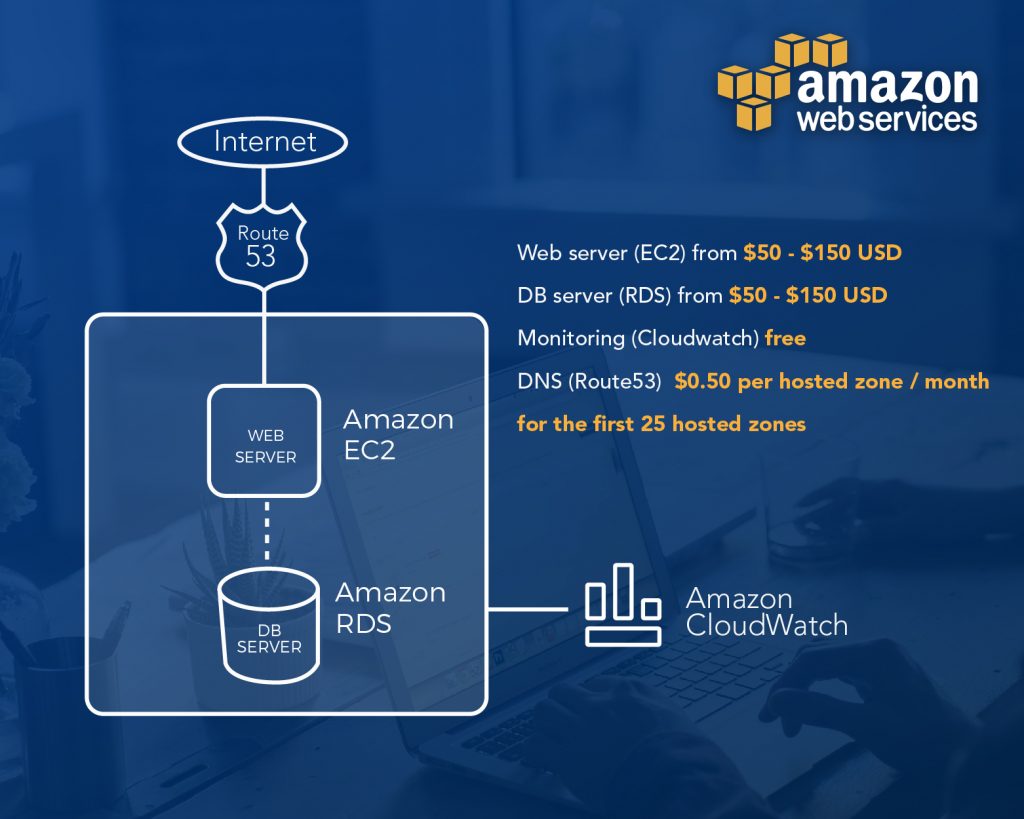
Basic Environment – (Website Hosting) $100 to $200 USD Monthly
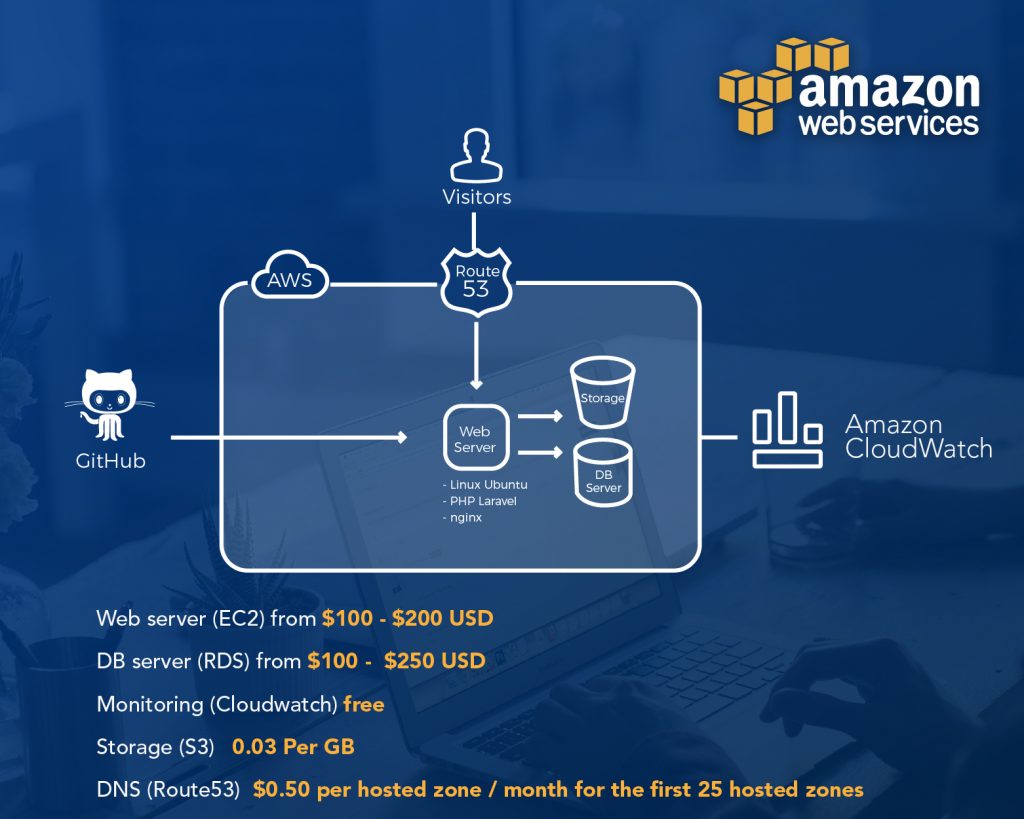
Intermediate Environment – (High Performance Website Hosting) $250 to $600 USD Monthly
Advanced Environment – (Highly Scalable and Available) $600 to $2500 USD Monthly
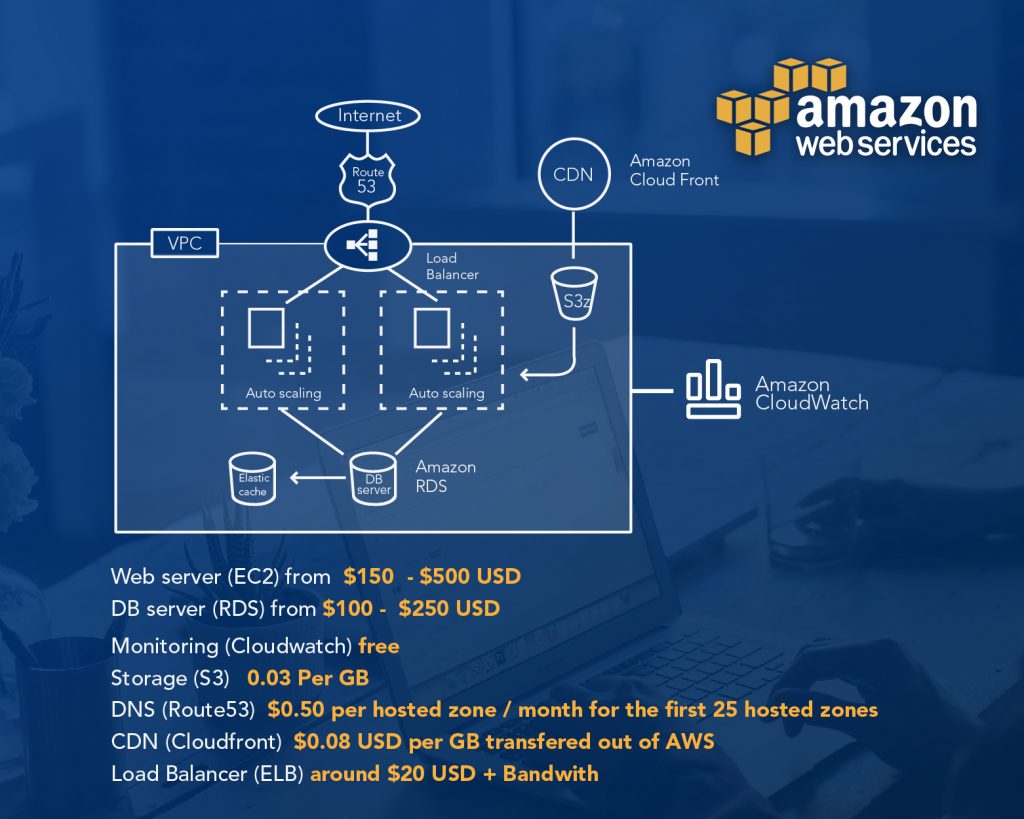
Of course, all these prices can vary depending on the type of EC2 instance, the type of RDS (if it is multi-region), the traffic/load, the CloudFront caching, the required storage, etc.
Example Monthly Costs for Different Environments
To put it all together, here are three example AWS environments in 2025 and what they might cost per month. (These estimates assume continuous usage; turning things off in off-hours could reduce costs further.)
Basic Small Website – ~$20/month
A personal website or dev/test setup can run on a very low budget. For instance, one small EC2 instance (e.g., t3.small) might be ~$15/mo on-demand, a 30 GB EBS volume about $2/mo, and 50 GB of S3 storage around $1/mo. With light usage, data transfer stays within the free 100 GB. Total ~ $20 per month.
This basic setup covers a single server, storage, and backups, and benefits from the AWS Free Tier if you’re eligible.
Intermediate Web App – ~$200/month
A small production web application with moderate traffic may use a more robust setup: for example, 2 EC2 instances (for load balancing and high availability), an Application Load Balancer, around 200 GB of data storage (EBS + S3), and about 500 GB of outgoing data per month.
In this scenario, the EC2 instances are the largest cost (say ~$120/mo combined if two t3.large instances), the ELB adds roughly $20–$25, storage costs come to maybe $10–$15, and data transfer about $36 (after the free 100 GB). All together you’d be looking at roughly $200 per month for a reliable, scalable small application infrastructure.
Advanced High-Traffic Setup – ~$2000/month
For a high-traffic or larger scale application, costs rise but are still manageable with AWS’s scalability. Imagine a setup with ~10 EC2 instances (across application servers, microservices, etc.), one or two load balancers, around 1 TB of combined storage (data and backups), and ~5 TB of data transfer out to users each month.
The EC2 compute would dominate the cost (for example, 10 m5.large instances ~ $720/mo, or larger instances could be ~$1500+).
Add perhaps $40–$50 for load balancers, about $100 for 1 TB of storage (blended across EBS and S3), and roughly $450 for 5 TB of data transfer (after free allowances).
This brings the monthly estimate to roughly $2000. Deploying on-demand at this scale is still far cheaper than maintaining equivalent physical servers, and you can optimize it further by using savings plans and tuning resources.
(Your actual costs will vary based on instance types, usage patterns, and regions – but these examples give a ballpark for comparison.)
How to Save Costs in AWS?
Even with AWS’s efficient pricing, it’s smart to optimize your usage. Here are five of the most impactful cost-saving practices and tools as of 2026:
Savings Plans & Reserved Instances
Committing to a one- or three-year plan for steady workloads can save up to ~70% compared to on-demand rates. AWS Savings Plans (introduced after 2018) are flexible discount programs that apply to your compute usage (EC2, Fargate, Lambda) regardless of instance family or region. Similarly, Reserved Instances let you reserve specific instance capacity. If you know you’ll run certain servers continuously, these options drastically lower the hourly price.
Right-Size with AWS Compute Optimizer
It’s easy to over-provision resources. AWS Compute Optimizer (and Cost Explorer) will analyze your usage and recommend rightsizing – for example, downgrading an EC2 instance that’s only 10% utilized, or switching to a newer instance type. By adjusting to the optimal instance size or family, you eliminate paying for capacity you don’t need. Regularly review these recommendations to trim waste continuously.
Use Auto Scaling & Scheduling
Take advantage of AWS Auto Scaling groups to scale down during low-traffic periods so you’re not paying for idle servers. Similarly, schedule non-production instances (dev, test, batch jobs) to shut off during off-hours (nights/weekends) – this can cut their cost by 50% or more if they don’t need to run 24/7. AWS Instance Scheduler or even simple scripts can automate this. Only pay for compute when you actually need it!
Leverage CloudFront and Cached Content
Serving data out from AWS can get pricey, so use Amazon CloudFront, AWS’s CDN, to cache and deliver content to users. CloudFront’s edge locations often have lower per-GB transfer costs and reduce load on your origin servers. Additionally, the caching means fewer direct requests to your EC2 or S3, which can cut your outbound data transfer fees. For web apps with static assets (images, videos, scripts), using CloudFront or other CDNs is a quick win for both performance and cost optimization.
Optimize Storage Costs
Apply lifecycle policies to move infrequently accessed data to cheaper storage classes. For instance, enable S3 Intelligent-Tiering on buckets, it will automatically transition objects to lower-cost tiers if they haven’t been accessed (all while keeping data instantly available when needed).
Use S3 Glacier for archives and delete old versions or unused data regularly. Also, clean up orphaned resources: delete unattached EBS volumes, obsolete snapshots, and unused Elastic IPs – these often accumulate unnoticed but incur monthly charges. By cleaning up and using the right storage tier for the job, you can significantly cut your storage spend.
Bonus Tip: Always utilize AWS’s cost monitoring tools. Set up AWS Budgets and alerts for unexpected spending, and review the AWS Cost and Usage Report. Awareness is key, the sooner you spot a cost anomaly or idle resource, the faster you can take action to reduce waste.
What New AWS Services and Features Can Help Optimize Costs?
- Enhanced Cost Planning: Upgraded AWS Pricing Calculator lets you model workload changes and compare Reserved Instances vs. Savings Plans with your own rates.
- Automated Cost Analysis: AWS Cost Explorer now includes a Cost Comparison tool for automatic month-over-month spend analysis.
- AI-Powered Insights: Amazon Q functions as a natural-language FinOps assistant, answering cost-related questions and providing recommendations.
- Optimization Recommendations: AWS Compute Optimizer adds rightsizing for databases (e.g., Aurora I/O-Optimized). Trusted Advisor now gives “discount-aware” savings checks.
- Customized Savings Plans Advice: Cost Optimization Hub personalizes recommendations based on term length and payment options, providing projected savings estimates.
In 2026, AWS pricing is no longer just about how much infrastructure you run, but how intelligently you run it. Teams that actively monitor usage, design cost-aware architectures, and leverage AWS optimization tools consistently achieve lower bills even as workloads scale.
Here at ClickIT, we help companies optimize AWS pricing, modernize cloud architectures, and prevent billing surprises before they happen.
Also read: AWS Security Tools

FAQs about AWS Pricing
AWS pricing is based on a pay-as-you-go model, where customers pay only for the resources they actually use. In 2026, AWS pricing typically depends on a combination of usage time, number of requests, data processed, and data transferred. This flexible model allows companies to scale infrastructure up or down without long-term commitment.
AWS pricing often increases after migration because resources are over-provisioned, left running unnecessarily, or not optimized as workloads grow. In most cases, higher AWS bills are caused by architecture and usage patterns not by AWS raising prices.
To calculate monthly cloud costs, estimate how long resources run and how much data they store or process.
For compute, multiply the hourly price of the instance by the number of hours used per month (typically ~730 hours for 24/7 usage).
For storage, multiply the price per GB by the amount of data stored each month.
Add data transfer, load balancing, and request costs if applicable. In practice, total cloud cost is the sum of compute + storage + networking + managed services, adjusted by discounts like Savings Plans or Reserved Instances.