Your AI prototype works beautifully in demos. Stakeholders are impressed, the concept is validated, and everyone agrees it’s time to build the real thing. Then reality sets in: the code that powered your proof of concept wasn’t designed for real users, real data, or real security requirements.
The gap between a working prototype and a production-ready AI application is where most projects stall or fail.
This guide walks through why that gap exists, how to evaluate your prototype’s readiness, and the specific steps that transform demo code into software that actually ships.
Blog Overview
- Most AI projects don’t fail at the idea; they fail when moving from prototype to real-world production.
- Prototypes prove feasibility; production systems require scalability, security, and reliability.
- The biggest gaps appear in architecture, data pipelines, testing, and security.
- Success depends on embedding AI into workflows, not just using a model.
- Production AI is a system (data + infrastructure + workflows), not just an LLM.
- Capabilities like RAG and agentic workflows are key to scaling beyond demos.
- Security and compliance shape production systems from day one.
- Moving to production requires structured steps: assess gaps, build pipelines, deploy, and optimize.
What Is the AI Prototype-to-Production Gap?
An AI prototype is a working model that proves an idea can function. A production-ready application, by contrast, is software that serves real users reliably, securely, and at scale. The distance between a working demo and a deployable product is where most AI projects get stuck.
Prototypes optimize for speed. Production systems optimize for everything else: uptime, security, compliance, performance under load, and graceful failure handling. A chatbot that impresses stakeholders in a demo room might crash when a hundred real users hit it simultaneously.
- AI Prototype: validates feasibility, handles limited users, runs in demo environments, skips error handling
- Production Application: manages real traffic, enforces security controls, includes monitoring and alerting, and meets compliance requirements
Why Most AI Prototypes Never Reach Production?
More AI prototypes fail to reach production than succeed. The reasons tend to follow predictable patterns.
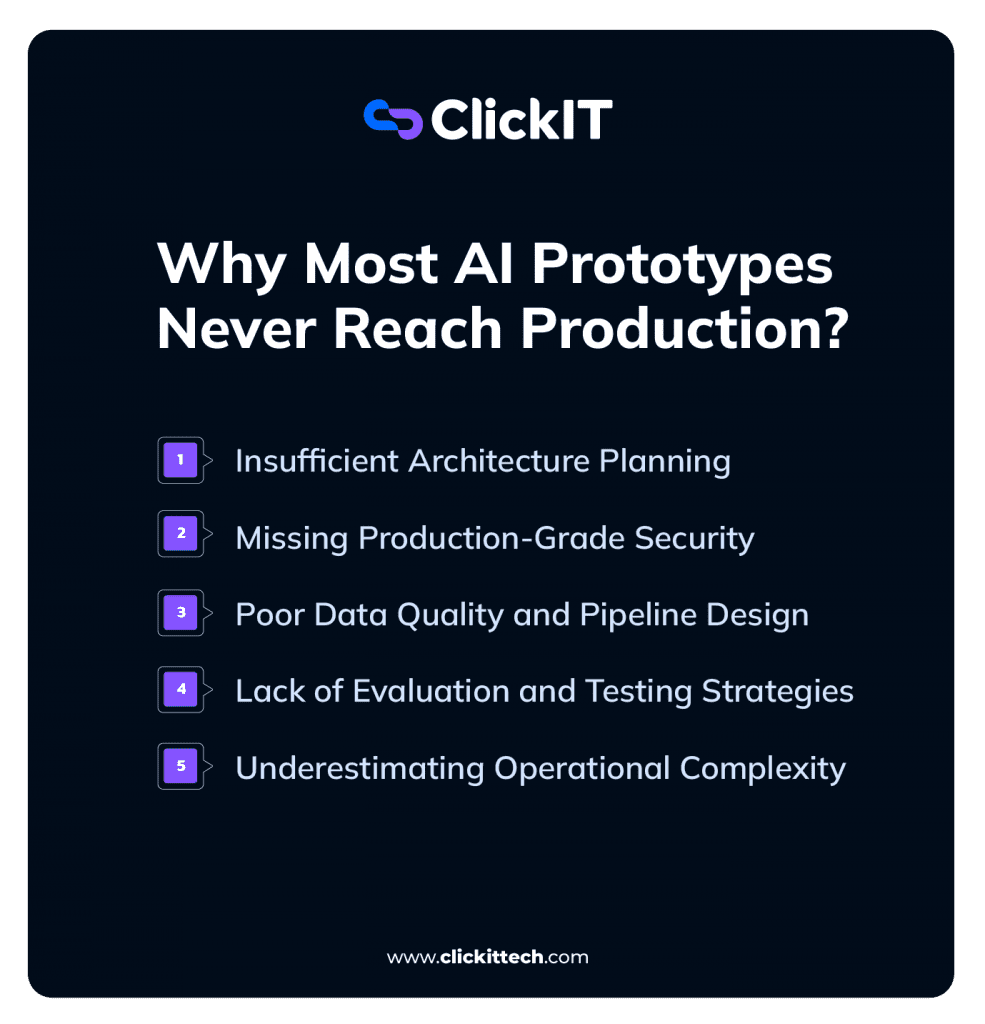
Insufficient Architecture Planning
Prototypes take shortcuts. Hardcoded API keys, monolithic single-file codebases, and tightly coupled components work fine for demos. They fall apart when you try to scale, update, or hand off the code to another team.
Building modular architecture from the start, even in a prototype, prevents the painful rewrite that otherwise becomes inevitable.
Missing Production-Grade Security
Authentication, authorization, and data encryption rarely appear in prototypes. That’s understandable when you’re just proving a concept.
However, real user data demands real protection, and retrofitting security into an existing codebase is significantly harder than building it in from the beginning.
Poor Data Quality and Pipeline Design
Prototypes run on sample data or synthetic datasets. Production runs on messy, incomplete, constantly changing real-world data. The gap between “works with test data” and “works with actual customer data” often represents months of engineering effort.
Clean data pipelines with proper ETL (extract, transform, load) processes are foundational to production AI systems.
Lack of Evaluation and Testing Strategies
AI outputs are non-deterministic. The same prompt might produce different responses. Traditional software testing doesn’t account for this variability, so teams building AI applications require specialized evaluation frameworks that measure output quality, accuracy, and consistency over time.
Without systematic testing, you can’t know whether your AI is actually performing well or just getting lucky.
Underestimating Operational Complexity
Production systems require logging, monitoring, alerting, and incident response procedures. Prototypes ignore all of this because they don’t run long enough to encounter problems. Once real users depend on your application, operational concerns consume a surprising amount of engineering attention.
What Are the Benefits of an AI Prototype Generator
An AI prototype generator is a tool that uses AI to create functional prototypes quickly. Products like Lovable, Bolt, and Replit fall into this category. They’ve changed how teams validate ideas before committing to full development.
Faster Time to Initial Validation
AI generators compress prototype creation from weeks to hours. A product manager can describe an application in natural language and have a working demo by the end of the day. This speed allows teams to test assumptions with stakeholders before investing significant resources.
Lower Cost for Early Experimentation
Exploring multiple concepts no longer requires hiring developers or writing extensive code. Teams can generate several prototype variations in an afternoon, compare them, and discard the ones that don’t resonate.
Rapid Iteration Based on User Feedback
When a stakeholder says, “What if we tried it this way instead?” AI generators make that change possible in minutes rather than days. This tight feedback loop accelerates the path to product-market fit.
Simplified Requirements for Non-Technical Teams
Product managers, designers, and business leaders can create functional demos without deep coding knowledge. This democratizes prototyping and reduces bottlenecks on engineering teams.
Best AI Prototyping Tools for Production-Ready Development
Not all prototyping tools produce code suitable for production. Some generate clean, exportable code while others create platform-dependent artifacts that require complete rewrites.
| Tool | Best For | Production Readiness | Key Limitation |
| ChatGPT/Claude | Concept validation | Low | Code requires significant refactoring |
| Bolt | Team iteration | Medium | Limited backend capabilities |
| Lovable | No-code prototyping | Medium | Platform lock-in concerns |
| Vercel v0 | Design-to-code | High | Frontend-focused |
| Replit | Full-stack development | High | Requires technical knowledge |
ChatGPT and Claude for Concept Validation
Large language models like ChatGPT and Claude excel at generating code snippets, testing logic, and answering “is this even possible?” They’re not designed for building complete applications, but they’re invaluable for early exploration.
Bolt for Rapid Team Iteration
Bolt works well for teams operating in fast feedback loops. When multiple stakeholders are involved in design decisions and changes happen frequently, Bolt’s speed becomes a significant advantage.
Lovable for No-Code AI Prototyping
Lovable is the friendliest option for non-developers who want to create functional demos. Teams planning for production, however, benefit from verifying code export capabilities early to avoid platform lock-in.
Vercel v0 for Design-to-Code Workflows
v0 transforms design descriptions into functional React components. The generated code tends to be cleaner and more maintainable than many alternatives, making it particularly valuable for frontend-heavy prototypes.
Replit for Full-Stack AI Development
Replit offers database integration, API development, and deployment capabilities in one environment. It requires more technical knowledge than other options but produces more production-ready results.
Read our blog Replit Alternatives
When to Move Beyond AI Prototyping Tools
Several signals indicate a prototype has outgrown AI generators:
- Complex business logic that requires custom implementation
- Strict security or compliance requirements
- High-scale needs beyond what the generated code can handle
- Integration requirements with enterprise systems
At this point, custom development becomes the appropriate path forward.
How to Design Production-Ready AI Application Architecture
Designing production-ready AI architecture requires more than choosing a model or framework. It means making decisions in the right order so the system can scale without expensive rewrites later.
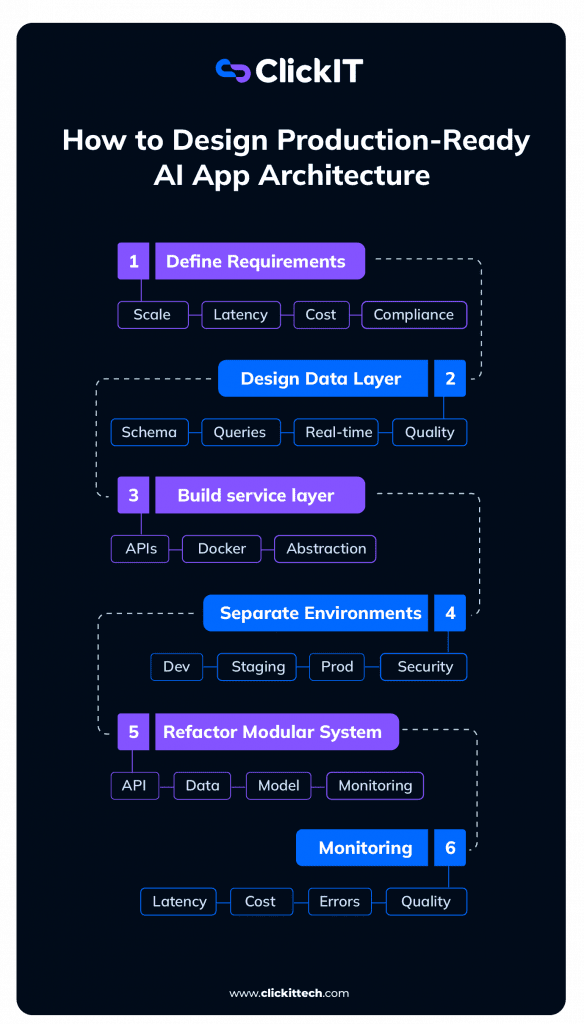
A practical architecture process should look like this:
Step 1: Define the Production Requirements First
Before choosing tools, define what production actually means for the application.
Consider:
- Expected users and request volume
- Latency requirements
- Data privacy and compliance needs
- Model usage costs
- Cloud or infrastructure constraints
- Integration points with existing systems
This avoids building an MVP that works in a demo but fails in real-world use.
Step 2: Design the Data Layer Before the AI Layer
Most production AI issues come from weak data architecture, not the model itself.
Start with:
- Database schema design
- Data quality requirements
- Query patterns
- Connection pooling
- Batch vs real-time data needs
Trade-off: skipping this step may speed up the prototype, but it usually creates higher rework costs when the system needs to scale.
Step 3: Build a Framework-Agnostic Service Layer
Avoid tying the full application directly to one model provider or framework.
Use:
- REST APIs or service interfaces
- Containerization
- Environment variables
- Clear abstraction between app logic and model logic
This makes it easier to switch models, change providers, or adapt infrastructure later without rebuilding the entire application.
Step 4: Separate Environments and Secure Configuration
Production AI applications need isolated environments from the start.
Create separate configurations for:
- Development
- Staging
- Production
Never hardcode API keys, credentials, or model access tokens. Use secrets management and role-based access before real data enters the system.
Step 5: Refactor the Prototype Into Modular Components
A single-file prototype is fine for validation, but not for production.
Break the system into:
- API layer
- Data layer
- Model/inference layer
- Monitoring layer
- Integration layer
This makes the system easier to test, debug, deploy, and scale across engineering teams.
Step 6: Add Monitoring, Cost Controls, and Feedback Loops
Once the architecture is modular, add visibility into how the AI system behaves in production.
Track:
- Latency
- Token usage and cost per request
- Error rates
- Model response quality
- Data pipeline failures
- User feedback
This helps teams detect failures early, control infrastructure costs, and improve the system continuously.
Essential LLM Concepts for Production AI Applications
Building production AI applications requires familiarity with several technical concepts that prototypes often skip over.
Retrieval Augmented Generation
RAG (Retrieval Augmented Generation) combines LLM capabilities with external knowledge bases. Instead of relying solely on what the model learned during training, RAG allows AI to access current, domain-specific information.
This reduces hallucinations and improves accuracy for specialized use cases.
AI Agents and Agentic Workflows
AI agents are autonomous systems that can take actions, use tools, and complete multi-step tasks. This differs from simple prompt-response interactions. An agent might search a database, call an API, and synthesize results all without human intervention between steps.
Advanced Prompt Engineering for Production
Production prompts require systematic design: system instructions, few-shot examples, and output formatting specifications. The casual prompts used in prototypes rarely perform well under production conditions.
How to Choose the Right LLM Model
Model selection depends on your specific requirements, but in production, it’s rarely a one-model decision.
- Latency (User Experience First):
Real-time applications (chat, copilots, support agents) require sub-second responses.
Use faster, smaller models like GPT-4o mini or Claude 3 Haiku to maintain responsiveness.
Users perceive anything >2–3 seconds as “slow,” regardless of accuracy. - Cost (Scale Changes Everything):
A prototype handling 100 requests/day is very different from production handling 1M+.
Open-source models like Llama 3 or smaller hosted models dramatically reduce cost at scale.
The wrong model choice can increase costs by 10–100x in production. - Accuracy (When Mistakes Are Expensive):
For healthcare, finance, or decision-making systems, higher accuracy justifies higher cost.
Use more capable models like GPT-4o or Claude 3 Opus.
Accuracy is often improved more by better data (RAG) than by switching models. - Context Window (Memory Matters):
Applications processing long documents (contracts, EHRs, reports) need large context windows.
Models like Claude 3 Sonnet or Gemini 1.5 Pro handle significantly more tokens.
Large context ≠ better results. Poor chunking will still break performance.
What Most Teams Get Wrong
Most teams choose a single “best” model. Production systems don’t work that way.
They use model routing strategies, for example:
- Small model → simple queries (cheap, fast)
- Large model → complex reasoning (expensive, accurate)
- RAG layer → inject domain knowledge (reduce hallucinations)
A typical architecture looks like:
- Tier 1: GPT-4o mini → handles 70–80% of requests
- Tier 2: GPT-4o → fallback for complex cases
- Layer: RAG + vector DB → improves accuracy without increasing model size
Result:
- Lower cost
- Faster responses
- Better overall accuracy
Rule of Thumb
- Start cheap + fast
- Add intelligence only where needed
- Use architecture (RAG, routing) before upgrading models
Security and Compliance for Production AI Applications
Security distinguishes production systems from prototypes. Demos can ignore security concerns; production systems cannot.
Secure Data Access Controls
Role-based access control, API authentication, and proper user authorization form the baseline. Every production AI system handles data that someone wants to protect.
Prompt Injection Protection
Prompt injection occurs when malicious inputs manipulate AI behavior. A user might craft input that causes the AI to ignore its instructions or reveal information it shouldn’t. Input validation and output filtering provide basic protection.
Data Masking for Sensitive Information
Production AI systems require techniques to prevent the exposure of personally identifiable information (PII) or other confidential data in their outputs. This becomes especially important when AI processes customer data.
HIPAA SOC 2 and PCI Compliance for AI
Regulated industries, such as healthcare, finance, and government, operate under specific compliance frameworks. HIPAA governs healthcare data, SOC 2 addresses security controls, and PCI applies to payment information. Compliance requirements shape architectural decisions from the beginning.
Step-by-Step Process to Take Your AI Prototype to Production
The transition from prototype to production follows a predictable sequence.
1. Document Production Requirements and Success Criteria
Define what “production-ready” means for your specific application. What user load do you expect? What response time is acceptable? What uptime is required? Without clear criteria, you can’t know when you’re done.
2. Assess Prototype Architecture Gaps
Audit the existing prototype against production requirements. Identify what changes are necessary. This gap analysis drives the entire transition plan.
3. Implement Security and Compliance Controls
Add authentication, authorization, encryption, and compliance documentation. For regulated industries, this step often requires specialized expertise.
4. Build Production Data Pipelines and Integrations
Replace prototype data sources with production data pipelines. This includes ETL processes and API integrations with existing systems.
5. Configure Staging and Production Environments
Set up separate environments with CI/CD pipelines, infrastructure-as-code, and deployment automation. Changes flow through staging before reaching production.
6. Establish Evaluation and Testing Framework
Implement evaluation datasets, automated tests, and monitoring dashboards. This framework ensures ongoing quality after deployment.
7. Deploy Monitor and Optimize in Production
Deploy the application and establish operational responsibilities: monitoring, incident response, cost optimization, and iterative improvement based on real-world performance.

How to Decide Between Building In-House or Partnering with AI Experts
Not every organization has the internal capabilities to complete the prototype-to-production journey. Here are the key evaluation criteria:
- Internal AI/ML expertise: Does your team have production AI experience?
- DevOps and infrastructure capabilities: Can you manage cloud-native AI infrastructure?
- Security and compliance knowledge: Do you have expertise in your industry’s requirements?
- Timeline constraints: Does your deadline allow for building internal capabilities?
- Long-term maintenance capacity: Who will support the system after launch?
Building Production AI Applications with a Trusted Development Partner
Organizations that lack internal AI expertise or face tight timelines often benefit from partnering with experienced development teams. The right partner brings production AI experience, cloud infrastructure expertise, and compliance knowledge that would take years to build internally.
ClickIT’s AI Development Services provide end-to-end support from prototype validation through production deployment, with certified AWS and AI engineers available within days. For regulated industries, built-in expertise in HIPAA, SOC 2, and PCI compliance accelerates the path to production while reducing risk.
FAQs about Taking AI Prototypes to Production
Timeline depends on prototype complexity, security requirements, and team expertise. Most organizations expect several months from a validated prototype to production deployment, though simpler applications with experienced teams can move faster.
Production AI development typically involves AI/ML engineers, DevOps specialists, security engineers, and product managers working together throughout the lifecycle.
A prototype is ready for production planning when it has validated the core value proposition with users, demonstrated technical feasibility, and received stakeholder approval to invest in productization.
Production AI applications require continuous monitoring, model performance evaluation, security updates, cost optimization, and periodic retraining as data and requirements evolve.