Have you ever wondered why AI models sometimes sound extremely confident, yet still get the facts wrong? In this blog, we will go deep into the RAG Architecture Diagram, dissect each component, and understand how RAG enables accurate, scalable, and production-ready AI systems.
In real-world applications, especially in enterprise environments, AI systems are expected to provide answers grounded in internal documents, policies, and state-of-the-art knowledge. And this is where traditional LLMs fall short. Understanding how this is achieved requires a clear view of the RAG Architecture Diagram, which illustrates how retrieval systems and language models work together.
RAG overcomes this limitation by integrating information retrieval with language generation; rather than being tethered to what the model “knows,” RAG can retrieve relevant external information and use it as context before generating an answer.
- How does a High-Level RAG Architecture Diagram Work?
- What are the Core Components of a Production RAG Architecture Diagram?
- What are the steps in the RAG Request Lifecycle?
- What are the Best Practices for Designing a Production-Ready RAG Architecture?
- Use cases for RAG
- FAQs About RAG Architecture Diagram
Blog Overview
- RAG Architecture Diagram visualizes the bridge between AI and your internal knowledge.
- LLMs hallucinate because they are disconnected from your data, not because they lack intelligence.
- RAG fixes this by separating retrieval (facts) from generation (language) so the model never has to guess.
- RAG is a system pipeline, not a single model, with ingestion, search, context building, inference, and validation.
- Accuracy depends more on data quality and retrieval strategy than model size, especially chunking, metadata, and hybrid search.
- RAG turns AI into a controlled, auditable, enterprise-ready system, replacing creativity with reliability and trust.
How does a High-Level RAG Architecture Diagram Work?
It is important to remember that RAG isn’t a single model or a magic tool; think of it as a pipeline. It connects several distinct systems, each with a specific role.
At its core, the workflow is actually quite simple:
User asks a question → System hunts for the right info → LLM writes the answer.
The RAG Architecture Diagram is just a map of this data journey. Here is how that flow plays out step-by-step:
- User Query: Everything kicks off when a user submits a question – whether that’s through a chatbot, a search bar, or an API call.
- Retrieval Layer: This is the part that changes the game. Instead of throwing that question straight to the LLM and hoping it remembers the answer (or doesn’t make one up), the system hits the pause button. It searches your own internal knowledge base first – usually using embeddings and a vector database – to grab the exact chunks of text relevant to the question.
- Context Injection: At this stage in the system, it has determined the information that is relevant to the question. It packages all this relevant information along with the user’s original question. The package is described as “context.”
- Answer Generation: Finally, the LLM takes that context and writes the response. But now, it’s not relying on its training memory; it’s strictly summarizing and formatting the data you just fed it.
This distinct separation between finding the facts and writing the answer is exactly what makes RAG different from standard LLM interactions.
What are the Core Components of a Production RAG Architecture Diagram?
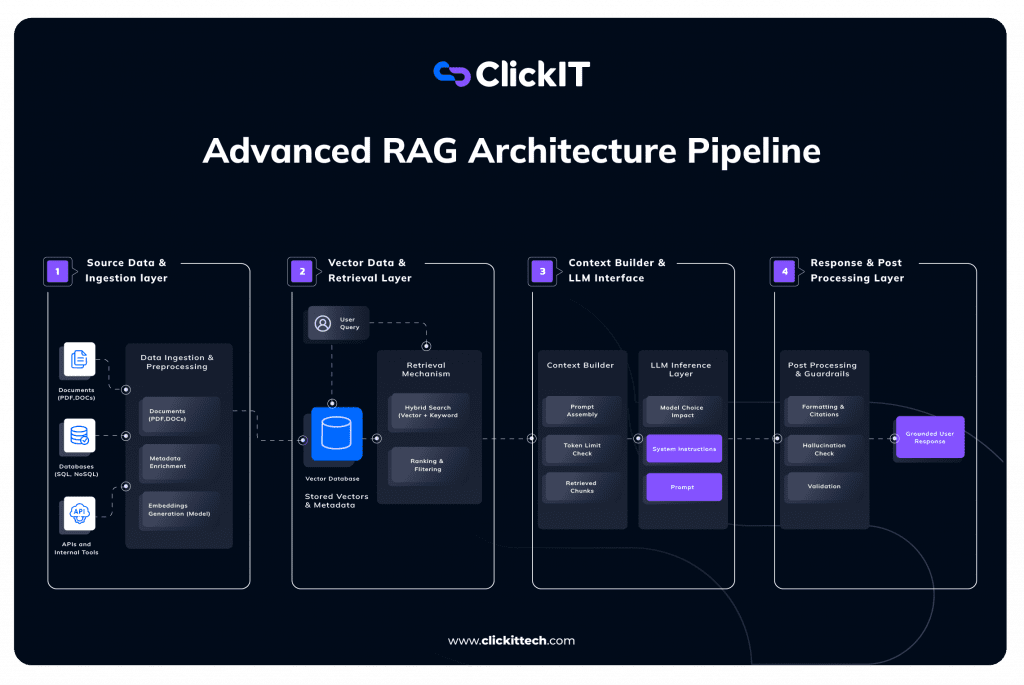
Now, let’s go ahead and get the RAG architecture explained to understand exactly what happens under the hood.
1. Ingestion Layer (Garbage In, Garbage Out Filter)
Your RAG system will only be as reliable as the data you put into it. No matter how intelligent the LLM may be, if the ingestion layer is weak, no one will be rescued. These early stages are all about cleaning up the huge mess of the Enterprise Data.
- Dealing with Mess: The real world isn’t clean. We work with PDFs, company Wikis, SQL databases, and random API endpoints. This tier must deal with it all at once without freaking out.
- Chunking Strategy: You can’t just feed a 50-page PDF into an LLM, it’ll hit the token limit immediately. We have to slice that document into smaller pieces, or “chunks.” The strategy matters here: chop it too small, and you lose context; keep it too big, and you confuse the search.
- Metadata Enrichment: That’s the magic stuff that goes into the RAG. We’re not just storing text. We’re annotating it. Who wrote the text? When was it written? It’s a “Policy” or a “Draft?” These little bits of added context allow us to filter our search results at a later date (“Hey, ignore any doc older than 2023″) instead of leaving it up to mere chance.
- Embeddings: At last, an embedding model is used to put all those pieces of text into vectors, which include a large list of numbers reflecting what words mean in text, not just keywords.
2. Vector Database & Retrieval (The Search Engine)
Now that our data is saved, there has to be a mechanism to extract the needle from the haystack when a user queries.
- Vector Database: It functions as the long-term memory for the entire system. It holds the vectors we obtained in step one.
- Hybrid Search: In a basic tutorial, you’ll see “Vector Search” (looking for similar meanings). In production, we use Hybrid Search. This combines vector search with old-school keyword search (BM25). Why? Because sometimes a user searches for a specific error code (like Error 503), and vector math might miss that exact match, while keyword search nails it.
- Ranking & Filtering: Just because we found 20 relevant documents doesn’t mean we should send all 20 to the LLM. We use a “Reranker” here to grade the results and toss out the weak matches, keeping only the absolute best context.
3. Context Builder & Inference (The Brain)
This is where retrieval meets generation. It’s the art of assembling the perfect prompt.
- Context Builder: You don’t just paste the retrieved text into the prompt. This component acts as a packaging center. It combines the user’s question, the strict system instructions (“You are a helpful assistant…”), and the retrieved data into a clean, formatted block.
- Token Management: Every LLM has a “context window” (a limit on how much text it can read). This step checks the math to ensure our prompt fits within the budget, truncating less important info if necessary.
- LLM Inference: The packaged prompt gets sent to the model. Because we’ve done the heavy lifting of finding the right data, the model doesn’t have to guess, it just summarizes the facts we gave it.
4. Post-Processing (The Safety Net)
In an enterprise environment, you can’t just pipe the raw AI output directly to the customer. This final layer is about trust and compliance.
- Hallucination Checks: This is an automated guardrail. We run a quick check: Does the answer the AI gave actually exist in the documents we retrieved? If the AI starts inventing facts, this layer flags it or blocks the response.
- Citations: To build trust, the system doesn’t just give an answer; it shows its work. It adds footnotes linking specific claims back to the original source files (e.g., “Source: HR Policy, Page 12”).
- Final Delivery: Only after passing these checks is the response shown to the user. This ensures the output is accurate, safe, and verifiable.
When you really boil it down, this whole RAG Architecture Diagram is about one thing: control.
We aren’t just blindly hooking a database up to a chatbot and hoping for the best. We’re building a system that dictates exactly what the AI knows, how it finds that info, and how it delivers the answer. In an enterprise environment, where being “close enough” isn’t good enough, that kind of control is the difference between a fun toy and a serious business tool.

What are the steps in the RAG Request Lifecycle?
It’s easy to think of RAG as a simple “search and reply” loop, but in a production system, we have to carefully manage the hand-offs between components. Let’s trace the exact journey of a request as it moves through the Orange/Yellow path (the Online Query flow) in the diagram above.
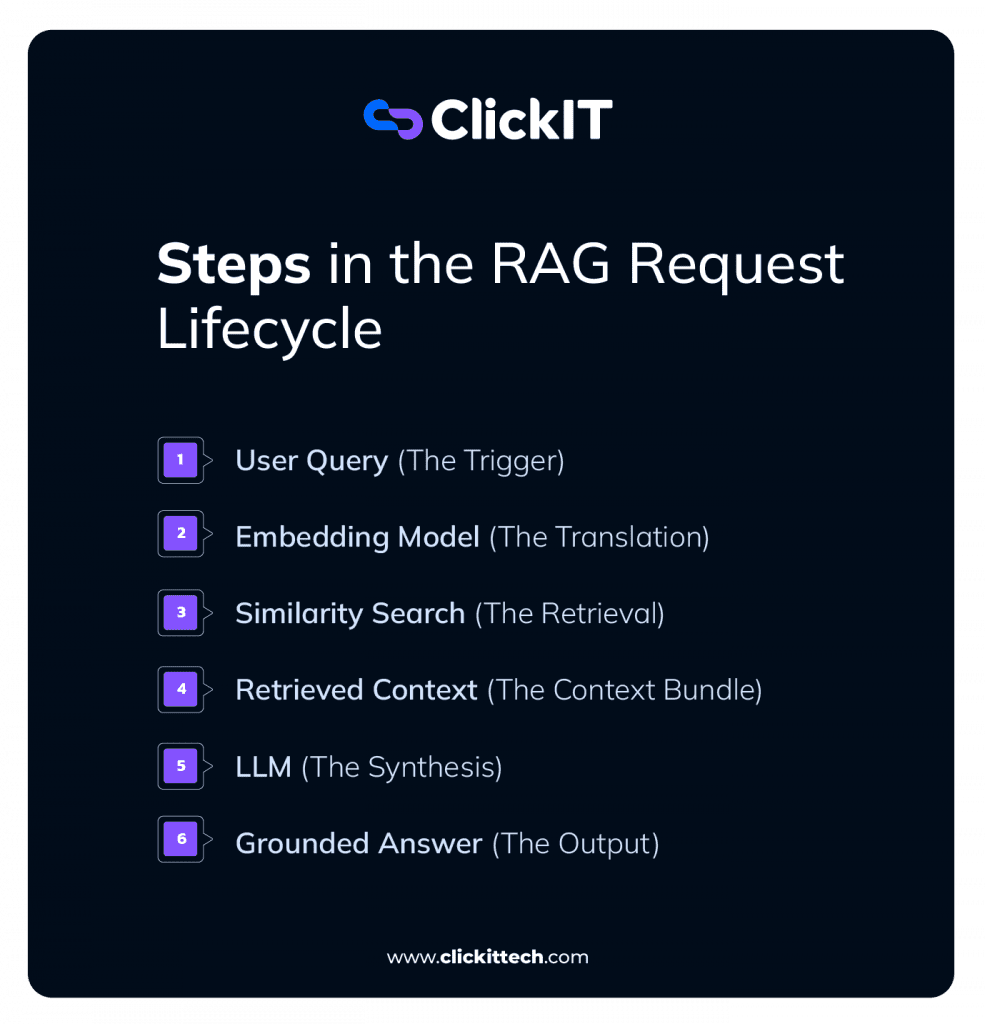
- User Query (The Trigger): It starts when the user asks a question, like “How do I reset the VPN?” In the diagram, you see this flows into two paths. One path goes to the LLM (so it knows what was asked), but the critical path goes down to the Embedding Model. We can’t search using raw text, so we have to translate this question into math first.
- Embedding Model (The Translation): The system takes the user’s text and runs it through the same embedding model used during the ingestion phase. This ensures the question and the documents are speaking the same “language” (vectors). If we skipped this, the database wouldn’t understand the query.
- Similarity Search (The Retrieval) The system sends those coordinates to the Vector Database. This isn’t a Google keyword search. As shown in the diagram, it performs a “Top-k Retrieval.” It measures the distance between the user’s question vector and the millions of document vectors stored in the cylinder. It grabs the chunks that are mathematically closest to the question—these are our “candidates.”
- Retrieved Context (The Context Bundle): This is a crucial transitional step. The system doesn’t just pass the raw search results to the AI. As the diagram shows, it bundles the Chunks (the actual text) with their Metadata (source info). This bundle forms the “knowledge” the AI will use to answer.
- LLM (The Synthesis): Now we reach the brain of the operation. The diagram illustrates the formula here: Prompt = User Query + Retrieved Context. We aren’t asking the LLM to write from memory. We are effectively saying: “Here is a user question, and here are 5 paragraphs of facts. Use ONLY these facts to answer the question.”
- Grounded Answer (The Output): Finally, the model generates the response. Because it was forced to use the “Retrieved Context,” the answer is grounded in your actual data rather than the model’s training hallucinations. The user gets an accurate, verifiable answer derived strictly from the blue/green source documents on the left.
What are the Best Practices for Designing a Production-Ready RAG Architecture?
When you move from a weekend prototype to an enterprise application, the cracks start to show immediately.
To keep your system stable and your users happy, you need to follow a few golden rules.
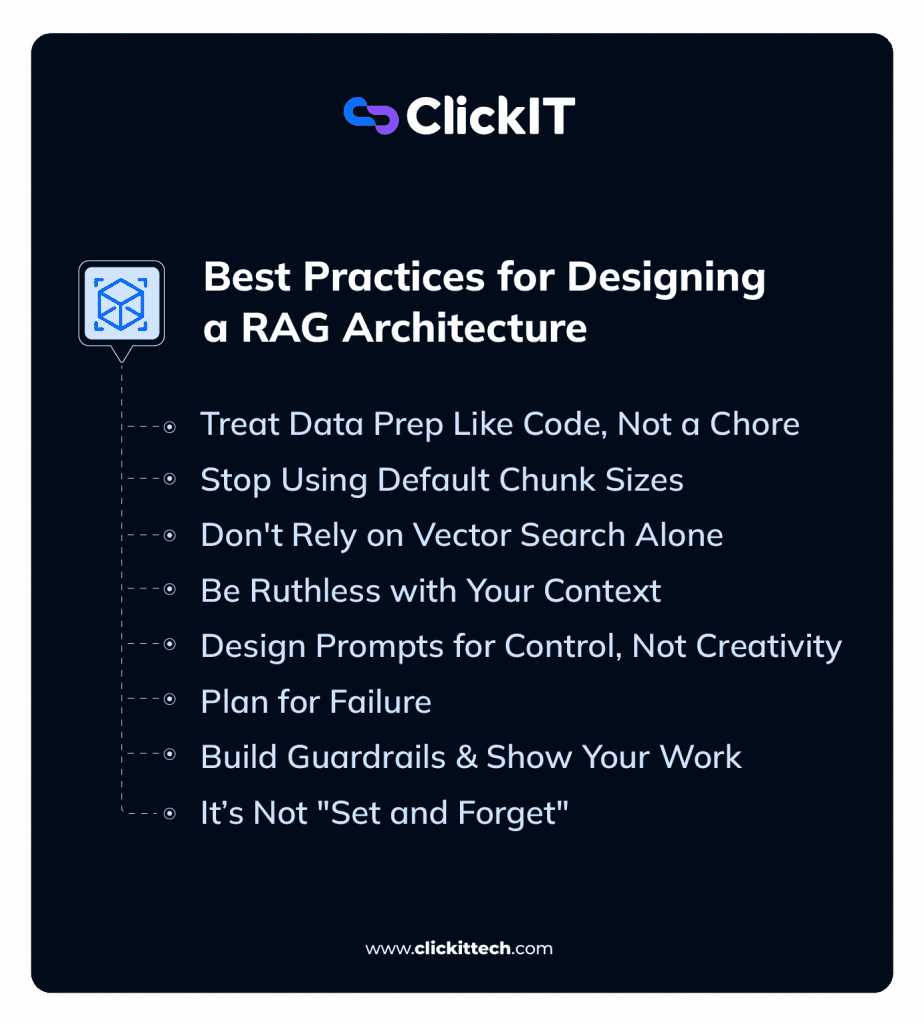
- Treat Data Prep Like Code, Not a Chore
Most RAG failures happen before the user even types a question. If you just dump raw PDFs or messy database exports into your vector store, you are setting yourself up to fail.- The Reality: A smaller model with clean, well-tagged data will outperform a massive model with messy data every single time.
- The Fix: Spend time cleaning headers/footers, fixing formatting, and adding rich metadata tags before you even think about embedding.
- Stop Using Default Chunk Sizes
There is no such thing as a universal “best” chunk size. Small chunks find facts but lose context; large chunks keep context but add noise.- The Trap: Sticking with the default 512 or 1024 token settings just because a tutorial used them.
- The Fix: Test different sizes based on your actual documents. If you are indexing technical manuals, you need different chunking logic than if you are indexing legal contracts.
- Don’t Rely on Vector Search Alone
Vector search (semantic similarity) is powerful, but it’s not magic. It understands concepts like “canine ≈ dog,” but it is terrible at exact matches.- The Gap: If a user searches for a specific part number like ID-9924-X or a specific error code, vector search often fails to find it because 9924 doesn’t have a “semantic meaning.”
- The Fix: Always use Hybrid Search. Combine vector search with old-school keyword search (like BM25). It gives you the best of both worlds: conceptual understanding and precise keyword matching.
- Be Ruthless with Your Context
Just because you retrieved 20 documents doesn’t mean you should feed all 20 to the LLM.- The Trap: Overloading the model with too much text (the “Lost in the Middle” phenomenon) actually makes the answers worse.
- The Fix: Filter aggressively. Use a re-ranker to score your results and throw out anything that isn’t highly relevant. Sending 3 perfect paragraphs is better than sending 10 “okay” ones.
- Design Prompts for Control, Not Creativity
In a RAG system, we don’t want the AI to be creative or a poet. We want it to be a boring, accurate analyst.- The Instruction: Your system prompt should clearly scream: “If the answer isn’t in the context provided, say you don’t know.”
- The Fix: Use disciplined prompts that admit ignorance. It is infinitely safer to say “I don’t know” than to guess or fill in the gaps.
- Plan for Failure (Because It Will Happen)
Even the best systems miss. Sometimes the document just isn’t there.- The Scenario: What happens when the retrieval returns nothing?
- The Fix: Handle these cases explicitly. It is far better to return a polite “I couldn’t find that information in the policy documents” than to have the model confidently make something up. Users trust honesty; they hate hallucinations.
- Build Guardrails & Show Your Work
In production, “trust me, bro” isn’t a valid citation. Verification is the only way to build trust.- The Requirement: Users need to know where the information came from.
- The Fix: Configure your system to return source filenames and page numbers with every answer. Also, run post-processing checks to ensure the output is safe and free of PII (Personally Identifiable Information).
- It’s Not “Set and Forget”
You can’t just deploy a RAG system and walk away.- The Loop: You need to monitor what users are actually asking. Are they getting “No results” for a common question? That tells you that you are missing a document.
- The Fix: Track your “thumbs up/down” feedback and low-confidence queries. The best RAG systems evolve based on how people actually use them.
Use cases for RAG
It is easy to get caught up in the hype, but where is RAG actually running in production? It isn’t just about making “smarter chatbots.” It is about solving specific data accessibility problems that standard LLMs simply cannot handle.
Here are the three most common scenarios where RAG is replacing traditional search and static automation.
1. The “Corporate Wiki” That Actually Works
We have all been there: you search for “Holiday Policy” in your company’s internal portal (like SharePoint or Confluence), and the search results include a 2018 document, a random meeting note, and a PDF that won’t open.
- The Problem: Traditional keyword search fails because employees don’t use the exact same phrasing as the HR team that wrote the policy.
- The RAG Solution: An employee asks, “Can I carry over my leave to next year?” The system doesn’t just look for the word “carry”; it understands the intent. It hunts down the relevant clause in the 2025 Employee Handbook, ignores the outdated 2018 version, and gives a direct “Yes” or “No” answer with the specific rules.
- The Value: It stops employees from wasting hours digging through folders just to find a simple answer.
2. The “Hallucination-Proof” Support Agent
Standard LLMs are great at being polite, but they are terrible at technical support. If you ask a generic GPT model how to reset a specific industrial sensor, it might politely invent a reset procedure that doesn’t exist.
- The Problem: You need the AI to be helpful, but you absolutely cannot afford for it to lie about technical specs.
- The RAG Solution: When a user asks, “How do I recalibrate the X-200 unit?”, the system retrieves the specific page from the Official X-200 Technical Manual. It summarizes the steps found only on that page and links back to the source PDF. If the manual doesn’t mention recalibration, the bot says, “I don’t know,” rather than guessing.
- The Value: It turns a creative storyteller into a disciplined technical support rep that sticks to the script.
3. Legal & Compliance Analysis
Lawyers and compliance officers deal with documents that are hundreds of pages long. They don’t need a summary; they need to find specific needles in the haystack.
- The Problem: Manually checking a 100-page vendor contract to see if it complies with new GDPR rules can take hours of reading.
- The RAG Solution: The system ingests the contract and retrieves every clause related to data privacy or liability. It then compares those specific clauses against the company’s internal compliance framework and highlights the gaps.
- The Value: Speed and proof. In legal work, an answer without a citation is useless. RAG provides the analysis and the page number to back it up.

Building a production-ready AI isn’t about finding a smarter model; it’s about building a better pipeline. By understanding the RAG Architecture Diagram, you stop treating the AI as a magic black box and start treating it as a predictable software component. You gain the ability to trace a wrong answer back to a specific missing document, a poor chunking strategy, or a weak retrieval step.
Ultimately, the RAG Architecture Diagram represents the shift from “creative writing” to “engineering.” It gives you the blueprint to build systems that don’t just chat, but actually solve business problems with accuracy, citations, and trust.
FAQs About RAG Architecture Diagram
If you want the AI to speak in a specific format or tone, fine-tune it. If you want it to accurate answer questions about your internal data, use RAG. Don’t mix them up.
Yes. The RAG Architecture Diagram is modular by design. You can build the retrieval pipeline once and swap the “brain” (e.g., from GPT-4 to Llama 3) anytime without rewriting your code.
Don’t force an answer. As implied in the RAG Architecture Diagram, you should set a strict “relevance threshold.” If the database finds no good matches, the system should admit it doesn’t know rather than hallucinating.